Small program learning notes of the code composition and framework structure
Introduction
The project code files of the small program are roughly divided into JSON configuration files, WXML template files, WXSS style files, JS script logic files. The core of the small program framework MINA is a responsive data binding system, which also reflects the MVVM development model. Small program is not “authentic” MVVM, it is a one-way binding.
Code Composition
Project catalog
The official project directory for the quickstart example is as follows
1
2
3
4
5
6
7
8
9
10
11
12
13
14
15
16
17
wx_quickstart
├── app.js
├── app.json
├── app.wxss
├── pages
│   ├── index
│   │   ├── index.js
│   │   ├── index.wxml
│   │   └── index.wxss
│   └── logs
│       ├── logs.js
│       ├── logs.json
│       ├── logs.wxml
│       └── logs.wxss
├── project.config.json
└── utils
    └── util.js
As you can see, the files are roughly categorized into these 4 types
- a JSON configuration file with a .json suffix
- WXML template file with .wxml extension
- WXSS style files with .wxss extension
- JS script logic file with .js extension
app.json
Below is an app.json with all the configuration options. It configures the path to the page file, window presentation, sets the network timeout, sets multi-tabs, etc.
1
2
3
4
5
6
7
8
9
10
11
12
13
14
15
16
17
18
19
20
21
22
23
{
  "pages": [
    "pages/index/index",
    "pages/logs/index"
  ],
  "window": {
    "navigationBarTitleText": "Demo"
  },
  "tabBar": {
    "list": [{
      "pagePath": "pages/index/index",
      "text": "首页"
    }, {
      "pagePath": "pages/logs/logs",
      "text": "日志"
    }]
  },
  "networkTimeout": {
    "request": 10000,
    "downloadFile": 10000
  },
  "debug": true
}
wxml
wxml (WeiXin Markup Language) is a set of labeling languages designed by the framework to build the structure of a page in combination with the underlying components and event system. Its role is the same as html, both are responsible for the structure of the page. Basic components include: view containers, basic content, form components, navigation, media components, maps, canvas, open capabilities and so on. For details, you can see the Components introduction in the official document. The capabilities of wxml are mainly as follows:
- Data binding
Use Mustache syntax (double curly braces) to wrap variables, you can do simple arithmetic inside the double curly braces, such as ternary arithmetic, etc.
- List Rendering Bind an array to a component using the
wx:forcontrol attribute, and repeat the rendering of the component using the data from each item in the array. - conditional rendering In the framework, use
wx:ifto determine if the block needs to be rendered. - Templates wxml provides templates where code fragments can be defined and then called in different places.
- Events wxml has bubbling events such as
touchstart,tap,longpress,transitionend,touchforcechange, etc. The touch class of events supports a capture phase. You can bind an event handler to a component, and event bindings are written in the form of key, value. key isbind, then it’s a normal event binding, such asbindtaporbind:tap;catchevent binding prevents the bubbling event from bubbling upwards;capture-bindlistens for events in the capture phase;capture-catchlistens for events in the capture phase;capture-catchlistens for events in the capture phase;capture-catchlistens for events in the capture phase. capture-catch` interrupts the capture phase and cancels the bubbling phase.
wxss
wxss (WeiXin Style Sheets) is a set of style languages for describing WXML component styles. It serves the same purpose as css, which is responsible for styling the page. Compared to css, wxss has the following features
- Dimensional units
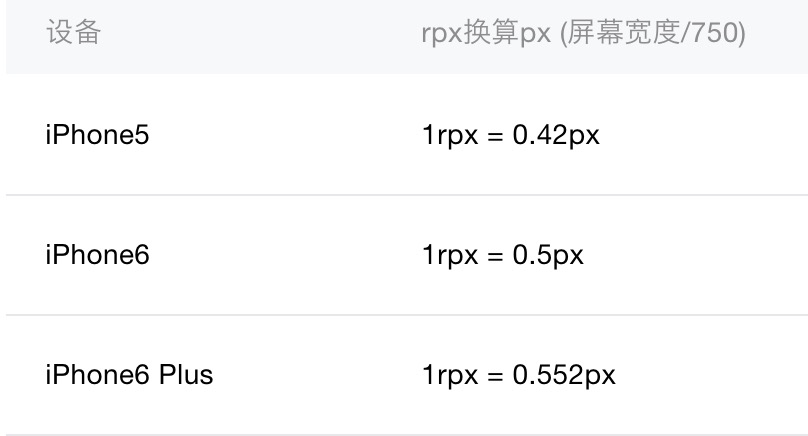
rpx (responsive pixel): Can adapt to the width of the screen. The specified screen width is 750rpx (iphone6). That is to say, using 750rpx as a base, it can be enlarged or reduced for different screen sizes. Therefore, designers can use iPhone6 as a standard for visualization.
- Style import
Outline style sheets can be imported using the @import statement.
- Selectors Compared to
css, only partial selectors are supported, including.class,#id,element,element, element,::after,::before. - Global and local styles Styles defined in app.wxss are global styles that apply to every page. Styles defined in the wxss file of a page are local styles, which only apply to the corresponding page and override the same selectors in app.wxss.
- Local resources are not available via css Therefore, when setting the
background-imageattribute, you can use a web image, or base64, or use the<image/>tag instead; when setting thesrcattribute of@font-face, you need to convert the font file to base64, you can go to https://transfonter .org/ for conversion.
js
One thing to note: the js runtime environment of the applet is JsCore, not the browser, and it can’t use the window and document objects. zepto/jquery will use the window and document objects, so it can’t be used either.
JsCore (JavaScriptCore) Parses JS and provides an execution environment. introduced by Apple after iOS7, it greatly facilitates our operation of js. We can run our js directly from the webview. JSCore just implements the standard JavaScript language, so there is no browser object (BOM) and so on. The native side of the WeChat small program framework and the js side through JsCore to communicate with each other.
Frame structure
MINA
The core of MINA, the framework for small programs, is a responsive data binding system that also embodies the ideas of MVVM development patterns (e.g. React, Vue). Here is the MVVM framework structure
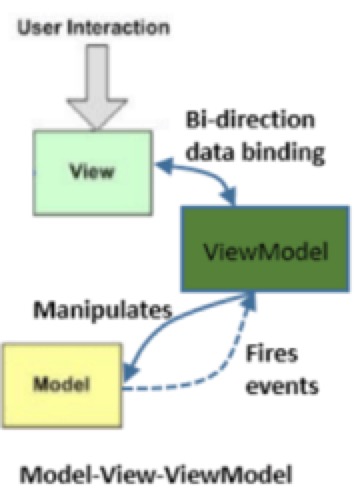
- View: View
- ViewModel: bound to the view data; get changes to the Model and update the View if necessary
- Model: data (communication with the back-end, AJAX requests and processing of data)
The framework of the applet is structured as follows:
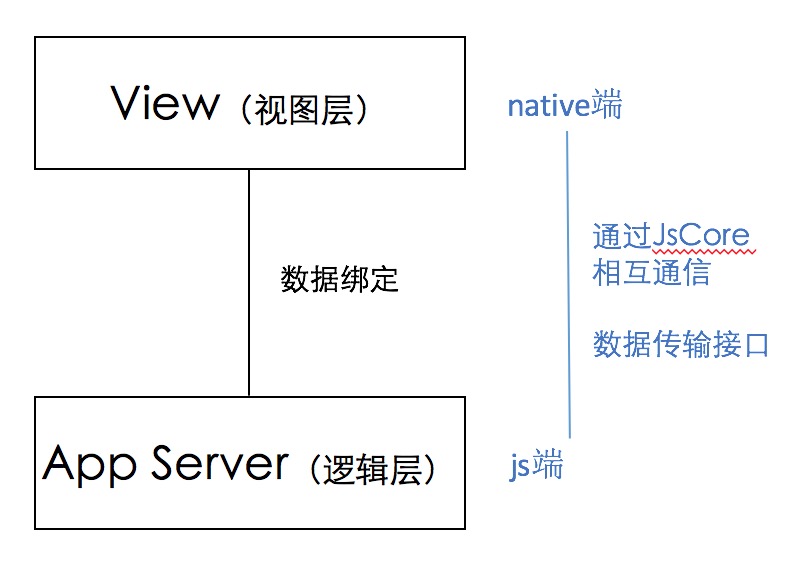
The rendering process looks like this:
- provides a JavsScript runtime environment (JsCore), written in JavaScript business code to complete the logical layer processing
- through the data transfer interface (registration of the data attribute of the Page and subsequent setData method call) to the logical layer of data transfer to the view layer. 3. the view layer by the WXML language template through the “data binding”.
- the view layer by the WXML language template written through the “data binding” and the logical layer of data transferred to merge into the display results and display.
- view style control written by the WXSS language style rules for configuration.
Difference with Vue
The biggest difference is that applets are not “authentic” MVVM, in terms of data binding, it’s unidirectional. In terms of data binding, it is unidirectional, whereas vue is bidirectional. For example, if you want to implement an app that provides an input box and synchronizes the user’s input to the view, as follows
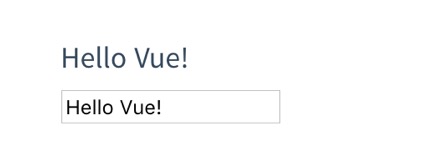
This is how it is implemented in vue:
1
2
3
<div id="app">

</div>
1
2
3
4
5
6
var app = new Vue({
  el: '#app',
  data: {
    message: 'Hello Vue!'
  }
})
This is how it is implemented in the applet
1
2
3
4
<view class="section">
  <view class="section__title">你输入的是:</view>
  <input bindinput="bindKeyInput" placeholder="输入同步到view中"/>
</view>
1
2
3
4
5
6
7
8
9
10
Page({
  data: {
    inputValue: ''
  },
  bindKeyInput: function(e) {
    this.setData({
      inputValue: e.detail.value
    })
  }
})
Because, the JS logic layer and view layer of WeChat applet are scattered in two different context environments (JS logic runs in JsCore, while the rendering of the view layer, including template rendering, style application, and event dispatching are in the native environment). So the data object (view-model) is not shared between the two layers, and the cost of synchronized communication is too high. As a result, any further changes to the original data object after initialization of the WeChat applet will never take effect and require a call to setData. As well, in terms of event bubbling blocking, the WeChat applet decides whether to block event bubbling or not at the time of listening.
Reference
- WeChat public platform - small program
- [What is the underlying principle of WeChat small program implementation?] (https://www.zhihu.com/question/50920642?sort=created)