Play flash games with electron
0 Background
Since elementary school, I’ve enjoyed playing pet connecting flash game on 4399.
However, because of flash’s security and other issues, many browsers no longer support flash. chrome, for example, Flash content (including audio and video) will no longer play properly in any version of Chrome starting in 2021, and the code related to the Flash plugin has been completely removed since v88.

1 Solution
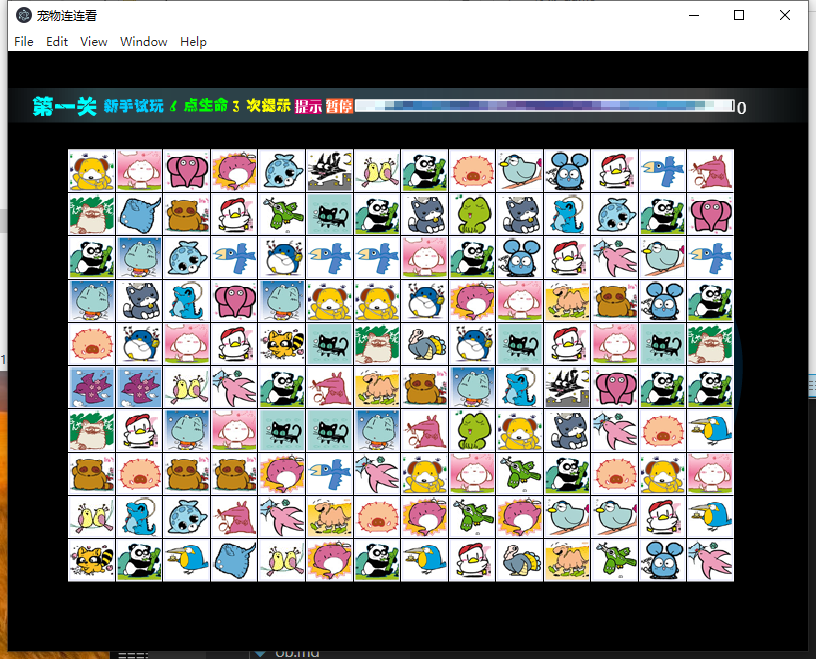
So it occurred to me, using Electron, to specify a version of chromium lower than v88, and use the Pepper Flash plugin to load beloved flash mini-games for anytime entertainment ^ ^.
1.1 electron principle
Electron is a framework for building desktop applications using JavaScript, HTML and CSS. It embeds Chromium and Node.js and allows you to use JavaScript, HTML and CSS code to create cross-platform applications that run on Windows, macOS and Linux. and Node.js and allows you to use JavaScript, HTML and CSS code to create cross-platform applications that run on Windows, macOS and Linux.
As I understand it, it’s about creating a service using Node.js, deploying a web page written by a developer to the Node.js service, and opening the URL in the Chromium browser.
1.2 Main code
Versions: the electron version of the project is ^11.4.7 and the chromium version is 87.0.4280.141.
In index.html, just put a pet flash game.
1
2
3
4
5
6
7
8
9
10
11
12
13
14
<!DOCTYPE html>
<html>
  <head>
    <meta charset="UTF-8">
    <!-- https://developer.mozilla.org/en-US/docs/Web/HTTP/CSP -->
    <meta http-equiv="Content-Security-Policy" content="default-src 'self'; script-src 'self'">
    <meta http-equiv="X-Content-Security-Policy" content="default-src 'self'; script-src 'self'">
    <title>宠物连连看</title>
    <link rel="stylesheet" type="text/css" href="./electron/main.css" />
  </head>
  <body style="margin: 0;">
    <embed class="game" src="./electron/assets/game.swf"> </embed>
  </body>
</html>
In window.js, implement the create window method and open index.html.
1
2
3
4
5
6
7
8
9
10
11
12
13
14
15
16
17
18
19
20
21
const { BrowserWindow } = require('electron');
const path = require('path');

function createWindow () {
  const win = new BrowserWindow({
    width: 800,
    height: 600,
    useContentSize: true,
    webPreferences: {
      plugins: true,
    }
  });

  win.loadFile('index.html');
  const contents = win.webContents;
  contents.on("did-finish-load", () => {
    contents.insertCSS("html, body { height: 100vh; width: 100vw; }");
  });
}

module.exports = createWindow;
In plugins.js, different Pepper Flash plugins are introduced depending on the operating system.
1
2
3
4
5
6
7
8
9
10
11
12
13
14
15
16
17
18
19
20
21
22
23
24
25
26
27
28
const getFlashPlugin = () => {
  if (process.platform === "win32") {
    if (process.arch === "x64") {
      return {
        pluginPath: "pepflashplayer64_34_0_0_164.dll",
        version: "34.0.0.164",
      };
    }

    return {
      pluginPath: "pepflashplayer32_32_0_0_363.dll",
      version: "32.0.0.363",
    };
  }

  if (process.platform === "darwin") {
    return {
      pluginPath: "PepperFlashPlayer.plugin",
      version: "30.0.0.127",
    };
  }

  return null;
};

module.exports = {
  getFlashPlugin
};
Introduce plugins.js and window.js in main.js and call them.
1
2
3
4
5
6
7
8
9
10
11
12
13
14
15
16
17
18
19
20
21
22
23
24
25
26
27
28
29
30
31
32
const { app, BrowserWindow } = require('electron');
const path = require('path');
const { getFlashPlugin } = require('./plugins');
const createWindow = require('./window');

// 获得系统里面flash插件的位置
const flashPlugin = getFlashPlugin();
let flashFlag = false;
if (flashPlugin) {
  const { pluginPath, version } = flashPlugin;
  app.commandLine.appendSwitch("ppapi-flash-path", path.join(__dirname, 'assets', pluginPath));
  app.commandLine.appendSwitch("ppapi-flash-version", version);
  flashFlag = true;
}

app.whenReady().then(() => {
  if (!flashFlag) {
    console.error('get flash plugin error');
  }
  console.log('chrome version: ', process.versions.chrome); //  Chromium v88 以上版本(包含 v88)内核的浏览器不再支持 Flash
  createWindow();
});

// 如果没有窗口打开则打开一个窗口 (macOS)
app.on('activate', function () {
  if (BrowserWindow.getAllWindows().length === 0) createWindow()
});

// 关闭所有窗口时退出应用-windows--linux
app.on('window-all-closed', function () {
  if (process.platform !== 'darwin') app.quit()
});
Detailed code can be found in the source code below.
2 Source Code
github repository: https://github.com/seminelee/electron-flash-linklink Just run simple commands and you’ll get a desktop version of the flash mini-game app! Hope you get the fun you’re looking for!
3 Final Result