Understanding event loops in browsers and Nodejs
What’s an event loop
event loop that is, the event loop, is a browser or Node to solve the javaScript single-threaded runtime will not block a mechanism , that is, we often use the principle of asynchronous .
Event loop in the browser
Main thread, execution stack, task queue
JavaScript has a main thread main thread and a call-stack execution stack__. All tasks are placed on the call-stack and wait to be executed by the main thread. The __execution stack, also known as the “call stack” in other programming languages, is a stack with a LIFO (last in first out) data structure that is used to store all the execution context that is created when the code is run. When the JavaScript engine first encounters your script, it creates a global execution context and presses it into the current execution stack. Whenever the engine encounters a function call, it creates a new execution context for that function and presses it to the top of the stack. The engine executes functions whose execution context is on the top of the stack. When the execution of the function finishes, the execution context is popped off the stack and the control flow reaches the next context on the current stack. Task Queue A task queue, or queue, is a first-in-first-out data structure.
Synchronous and asynchronous tasks
JavaScript single-threaded tasks are classified as synchronous and asynchronous.
- Synchronous tasks wait for the main thread to execute them sequentially in the Execution Stack.
- Asynchronous tasks go into Event Table and register functions. When the specified thing completes, Event Table moves this function into the task queue. Waiting for the main thread to become idle (execution stack is emptied), tasks from the task queue are read into the stack in order waiting for the main thread to execute them.
As pictured: 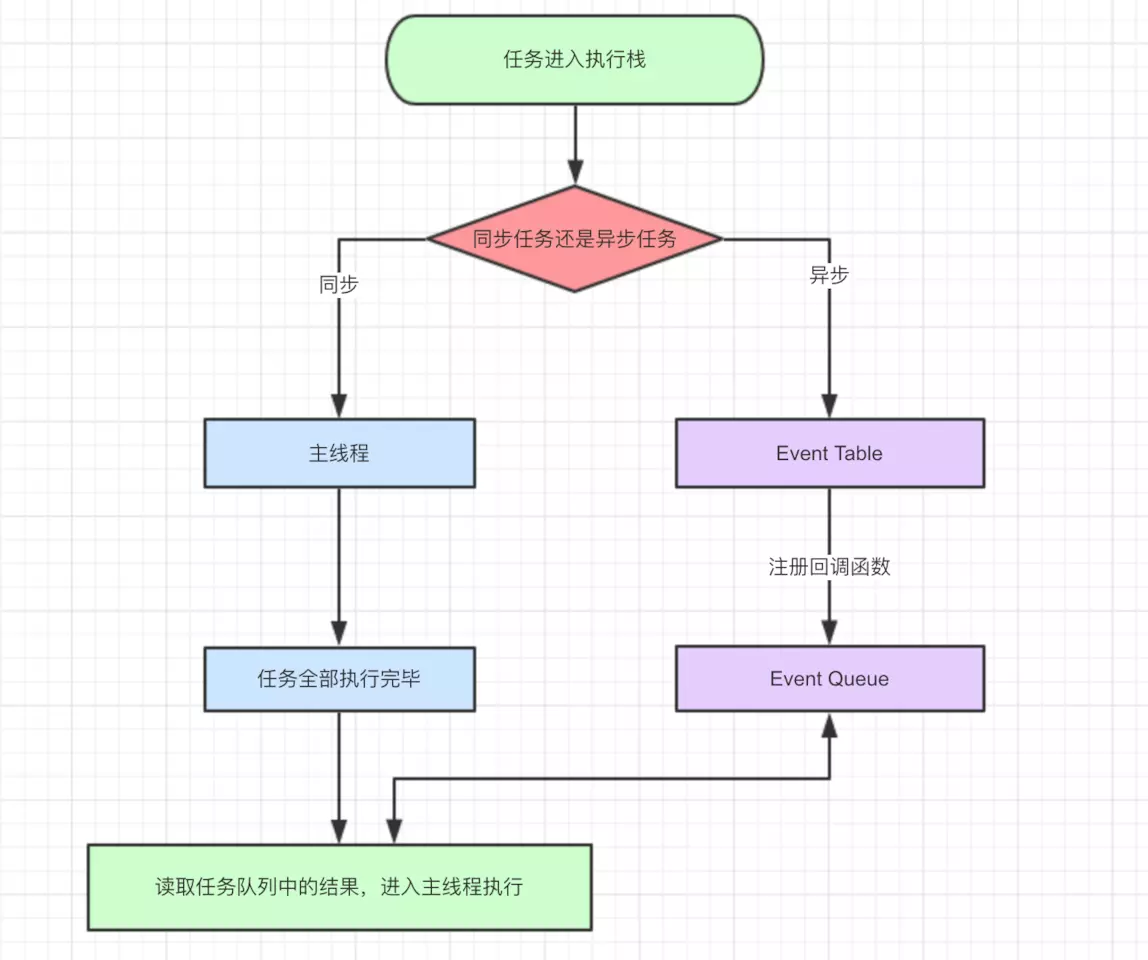
Macro and microtasks
In addition to the broad definition of synchronous and asynchronous tasks, we have a more fine-grained definition of tasks. At a high level, there are MacroTasks and MicroTasks in JavaScript.
- MacroTask (MacroTask) including script all the code, setTimeout, setInterval, I/O, UI Rendering and so on;
- MicroTask (micro task) including Process.nextTick (Node unique), Promise, Object.observe (deprecated) and so on.
JS engine first in the macro task queue to take out the first task execute script, after the execution of the micro task queue to take out all the tasks in the order of execution; and then take the macro task, and so on until the two queues of tasks are taken out of the loop. As shown in the figure: 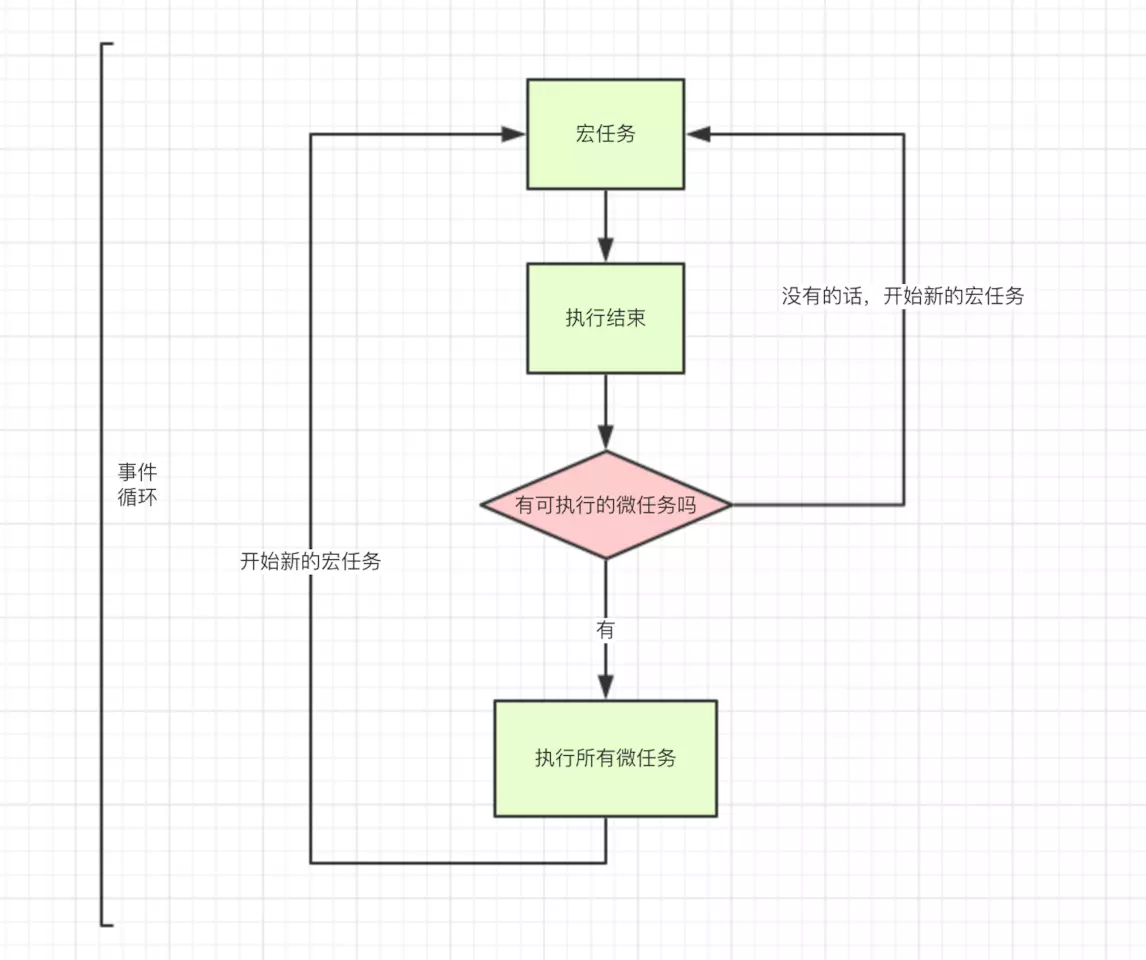
Overall
- The whole script enters the main thread as the first macro task. 2.
- Synchronous tasks are put on the execution stack, asynchronous tasks go to Event Table and register functions, and their callback functions are put into the macro task queue and micro task queue by category.
- After executing all synchronous tasks, start reading the results from the task queue. Check the microtask queue and execute the tasks in order if they are available.
- After executing all microtasks, start the next macro task. This cycle continues until the tasks in both queues (the macro task queue and the micro task queue) have been executed.
Example
1
2
3
4
5
6
7
8
9
10
11
12
13
14
setTimeout(function() {
  console.log('宏事件3');
}, 0);

new Promise((resolve) => {
  resolve(1)
  console.log('宏事件1')
}).then(function() {
  console.log('微事件1');
}).then(function() {
  console.log('微事件2');
});

console.log('宏事件2');
Implementation results:
1
2
3
4
5
宏事件1
宏事件2
微事件1
微事件2
宏事件3
The exact process is this:
Execute scripttask is put into macro task queue and execution stack, main thread executes script,setTimeout callback functionis put into macro task queue, printsmacro event 1,Promise then1is put into micro task queue, printsmacro event 2,Execute scripttask is finished, execution stack is emptied.- Execute
Promise then1from the microtask queue,Promise callback function 1is put on the execution stack, the main thread executesPromise callback function 1, printsmicroevent 1. The callback function returnsundefined, at which point there is another chained call to then, which is put into the microtask queue again, printingMicroevent2. Check that the microtask queue is empty. - The
execute scripttask of the macro task queue is completed, thesetTimeout callback functionis placed on the execution stack, the main thread executes, andsetTimeoutis printed. The execution stack is empty and the macro task queue is empty.
Example 2: Adding async/await
1
2
3
4
5
6
7
8
9
10
11
12
13
14
15
16
17
18
19
20
21
22
23
24
25
26
27
console.log('script start')

async function async1() {
  await async2()
  console.log('async1 end')
}
async function async2() {
  console.log('async2 end')
}
async1()

setTimeout(function() {
  console.log('setTimeout')
}, 0)

new Promise(resolve => {
  console.log('Promise')
  resolve()
})
  .then(function() {
    console.log('promise1')
  })
  .then(function() {
    console.log('promise2')
  })

console.log('script end')
First, we need to understand async/await first. async/await is actually syntactic sugar for promsie. Below:
1
2
3
4
5
// async await
async function async1() {
  await async2()
  console.log('async1 end')
}
It can be understood as
1
2
3
4
5
6
7
8
9
10
11
12
// chrome 73版本(新规范)
function async1() {
  return RESOLVE(async2).then(() => {
    console.log('async1 end')
  })
}
// chrome 73版本以下
function async1() {
  return Promise.resolve(async2).then(() => {
    console.log('async1 end')
  })
}
- In the new specification,
RESOLVE(async2)returnsasync2directly forasync2as apromise, thenasync2’sthenmethod is called immediately, and its callback goes immediately to the task queue. Promise.resolve(async2), on the other hand, even though thepromiseis certain toresolvetoasync2, the process itself is asynchronous, i.e., it’s theresolveprocess of the newpromisethat’s now going into the task queue, and so thethenmethod of thepromisewon’t be called immediately, but will have to wait until thethenmethod of theasync2returnsasync2, and its callback goes into the task queue immediately. is not called immediately, but only when the current task queue executes into the aforementionedresolveprocedure, and then its callback (which continues after theawaitstatement) is added to the task queue, so the timing is late.
So, in chrome version 73, the printout is:
1
2
3
4
5
6
7
8
script start
async2 end
Promise
script end
async1 end
promise1
promise2
setTimeout
Printing results in chrome version 73 and below:
1
2
3
4
5
6
7
8
script start
async2 end
Promise
script end
promise1
promise2
async1 end
setTimeout
event loop in Nodejs
Getting to know Nodejs first
Features of Nodejs
Node.js is characterized by its use of asynchronous I/O and event-driven architecture. For highly concurrent solutions, the traditional architecture is a multi-threaded model, while Node.js uses a single-threaded model that uses non-blocking asynchronous requests for all I/O, avoiding frequent thread switches. Asynchronous I/O is implemented in such a way that since most modern kernels are multithreaded, they can handle multiple operations executing in the background. node.js maintains a queue of events as it executes, and the program enters an event loop while it executes and waits for the next event to arrive. When an event arrives, the event loop hands off the operation to the system kernel. When an operation is completed the kernel tells Nodejs and the corresponding callback is pushed to the event queue and waits for the program process to process it.
The architecture of Nodejs
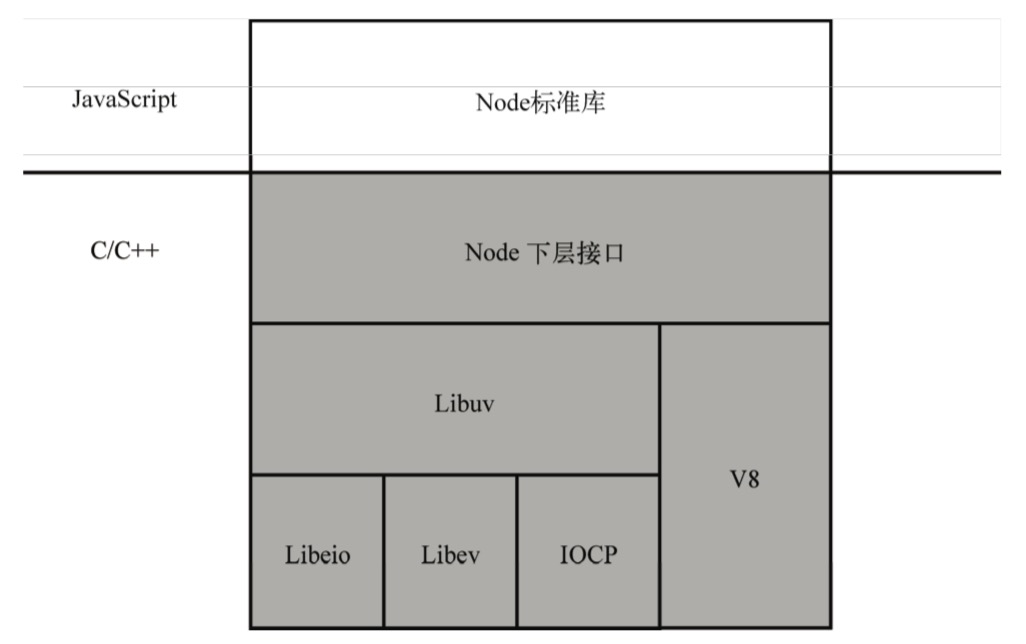 Node.js uses V8 as the JavaScript engine and supports event-driven and asynchronous I/O using the efficient libev and libeio libraries.The developers of Node.js have also abstracted the layer libuv on top of libev and libeio.For the POSIX1 operating system, libuv supports event-driven and asynchronous I/O by encapsulating the libev and libeio libraries to utilize epoll or kqueue. For POSIX1, libuv utilizes epoll or kqueue by encapsulating libev and libeio. libuv uses the Windows IOCP mechanism to achieve the same high performance across platforms. Event Loop is implemented in libuv.
epoll, kqueue, and IOCP are all multiplexed IO interfaces, i.e., application programming interfaces that support multiple simultaneous asynchronous I/O operations. Of these, epoll is exclusive to Linux, while kqueue exists on many UNIX systems, including Mac OS X.
The mechanics of running Nodejs
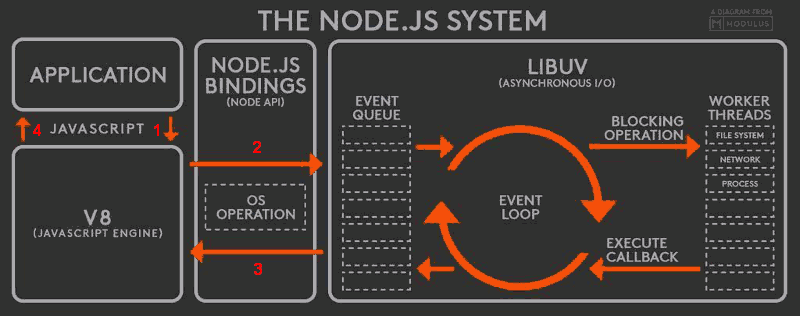 The Node.js runtime mechanism is as follows.
- The V8 engine parses JavaScript scripts.
- The parsed code calls the Node API.
- The libuv library is responsible for the execution of the Node API. It assigns different tasks to different threads, forming an Event Loop that returns the results of the tasks to the V8 engine in an asynchronous fashion.
- The V8 engine then returns the results to the user.
6 phases of an event loop
When Node.js starts, it initializes the event loop, processes the supplied input scripts that may make asynchronous API calls, schedule timers, or call process.nextTick(), and then starts processing the event loop.
1
2
3
4
5
6
7
8
9
10
11
12
13
14
15
16
17
18
┌───────────────────────┐
┌─>│        timers         │
│  └──────────┬────────────┘
│  ┌──────────┴────────────┐
│  │     pending callbacks │
│  └──────────┬────────────┘
│  ┌──────────┴────────────┐
│  │     idle, prepare     │
│  └──────────┬────────────┘      ┌───────────────┐
│  ┌──────────┴────────────┐      │   incoming:   │
│  │         poll          │<─────┤  connections, │
│  └──────────┬────────────┘      │   data, etc.  │
│  ┌──────────┴────────────┐      └───────────────┘
│  │        check          │
│  └──────────┬────────────┘
│  ┌──────────┴────────────┐
└──┤    close callbacks    │
   └───────────────────────┘
- timers: Execute callbacks that are due in setTimeout and setInterval.
- pending callback: A few callbacks from the previous loop are placed in this stage.
- idle, prepare: Used internally only.
process.nextTick()is executed in this stage. - poll: the most important stage, executes the pending callback and will block in this stage if appropriate.
- check: executes the setImmediate callback.
- close callbacks: callbacks that execute close events, such as socket.on(‘close’[,fn]) or http.server.on(‘close, fn).
setImmediate() is to insert the event into the end of the event queue, and the callback function specified by setImmediate will be executed as soon as the main thread and the function of the event queue are finished.
Each loop of the event loop goes through the above stages in turn. Each stage has its own FIFO callback queue (the timer stage actually uses a minimal heap rather than a queue to hold all the elements, e.g., the callbacks for the timeout are called in the order of their timeout times, not a FIFO queue logic), and whenever it enters a certain stage, it will take the callbacks out of the queue it belongs to When the queue is empty or a callback has been executed, the callback will be called from the queue. When the queue is empty or the number of callbacks executed reaches the system’s maximum number, the next stage. These six phases are called a round-robin.
timers
In the timers phase, the callbacks due in setTimeout and setInterval will be executed, which need to be set to a milliseconds number, theoretically, the callback callbacks should be executed as soon as the time arrives, but due to the system’s scheduling may be delayed, and the expected time cannot be reached. The following is an example:
1
2
3
4
5
6
7
8
9
10
11
12
13
14
15
16
17
18
19
20
21
22
23
24
const fs = require('fs');

function someAsyncOperation(callback) {
  // Assume this takes 95ms to complete
  fs.readFile('/path/to/file', callback);
}

const timeoutScheduled = Date.now();

setTimeout(() => {
  const delay = Date.now() - timeoutScheduled;

  console.log(`${delay}ms have passed since I was scheduled`);
}, 100);

// do someAsyncOperation which takes 95 ms to complete
someAsyncOperation(() => {
  const startCallback = Date.now();

  // do something that will take 10ms...
  while (Date.now() - startCallback < 10) {
    // do nothing
  }
});
When entering the event loop, it has an empty queue (fs.readFile() has not completed yet), so the timer waits for the number of milliseconds remaining, and when it reaches 95ms (assuming that fs.readFile() takes 95ms), fs.readFile() completes reading the file and the callback whose completion takes 10 milliseconds is added to the polling queue and executed. Therefore, a callback function that was set to execute after 100ms will execute after about 105ms. P.S. The uv__run_timers function in the timers source code node/deps/uv/src/timer.c.
pending callbacks
This phase performs callbacks for certain system operations (such as TCP error types). For example, if TCP socket ECONNREFUSED receives when connect is attempted, some * nix systems want to wait to report the error. This is performed in the PENDING CALLBACKS phase.
poll (polling)
Performs a pending callback, blocking in this phase where appropriate. The poll phase has two main functions:
- Performs I/O (connection, data in/out) callbacks.
- Handles events in the polling queue.
When the event loop enters the poll phase and there are no timers in the timers that can be executed, the
- If the poll queue is not empty, the event loop traverses its queue of callbacks synchronizing their execution until the queue is empty, or the system-dependent limit is reached.
- If the poll queue is empty, it checks to see if there is a setImmediate() callback to be executed, and if there is, it immediately enters the execution check phase to execute the callback.
If there are timers that can be executed and the poll queue is empty, it will determine if any timer has timed out, and if so, it will go back to the timer phase and execute the callback.
check
This stage executes the callback for setImmediate. setImmediate() is actually a special timer that runs in a separate stage of the event loop. It uses a libuv API which executes the callback after the poll phase is complete.
setImmediate()andsetTimeout()are similar, but behave in different ways depending on when they are called.
setImmediate()is designed to execute scripts in the check phase after the current poll phase has completed .setTimeout()schedules scripts to run after a minimum (ms) elapsed time, during the timers phase.
An example:
1
2
3
4
5
6
7
8
9
10
const fs = require('fs');

fs.readFile(__filename, () => {
  setTimeout(() => {
    console.log('timeout');
  }, 0);
  setImmediate(() => {
    console.log('immediate');
  });
})
The result is
1
2
immediate
timeout
The main reason for this is that after reading the file in the I/O stage, the event loop will first go to the poll stage, and when it finds that there is a setImmediate that needs to be executed, it will immediately go to the check stage to execute the setImmediate callback. Then it will enter the timers stage and execute setTimeout to print the timeout.
close callbacks
If the socket or handle is suddenly closed (e.g. socket.destroy()), then the ‘close’ event will be emitted at this stage. Otherwise, it will be emitted via process.nextTick().
The
process.nextTick()method adds a callback to the next tick queue. Once all the tasks in the current event polling queue have been completed, all callbacks in the next tick queue are called in turn. That is, when each phase is complete, the nextTick queue, if it exists, is emptied of all callback functions in the queue and is executed in preference to other microtasks.
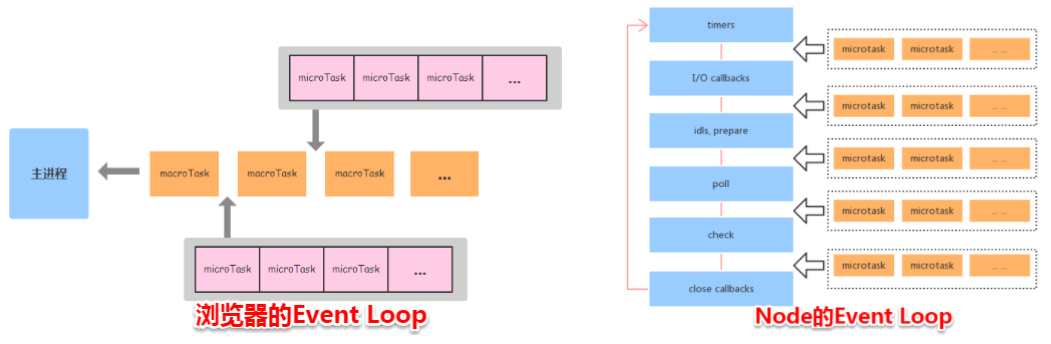
Event Loop Differences between Nodejs and Browsers
- On the Node side, the microtask is executed between stages of the event loop.
- On the browser side, the microtask is executed after the macrotask of the event loop has been executed
An example:
1
2
3
4
5
6
7
8
9
10
11
12
setTimeout(()=>{
    console.log('timer1')
    Promise.resolve().then(function() {
        console.log('promise1')
    })
}, 0)
setTimeout(()=>{
    console.log('timer2')
    Promise.resolve().then(function() {
        console.log('promise2')
    })
}, 0)
Browser-side results: 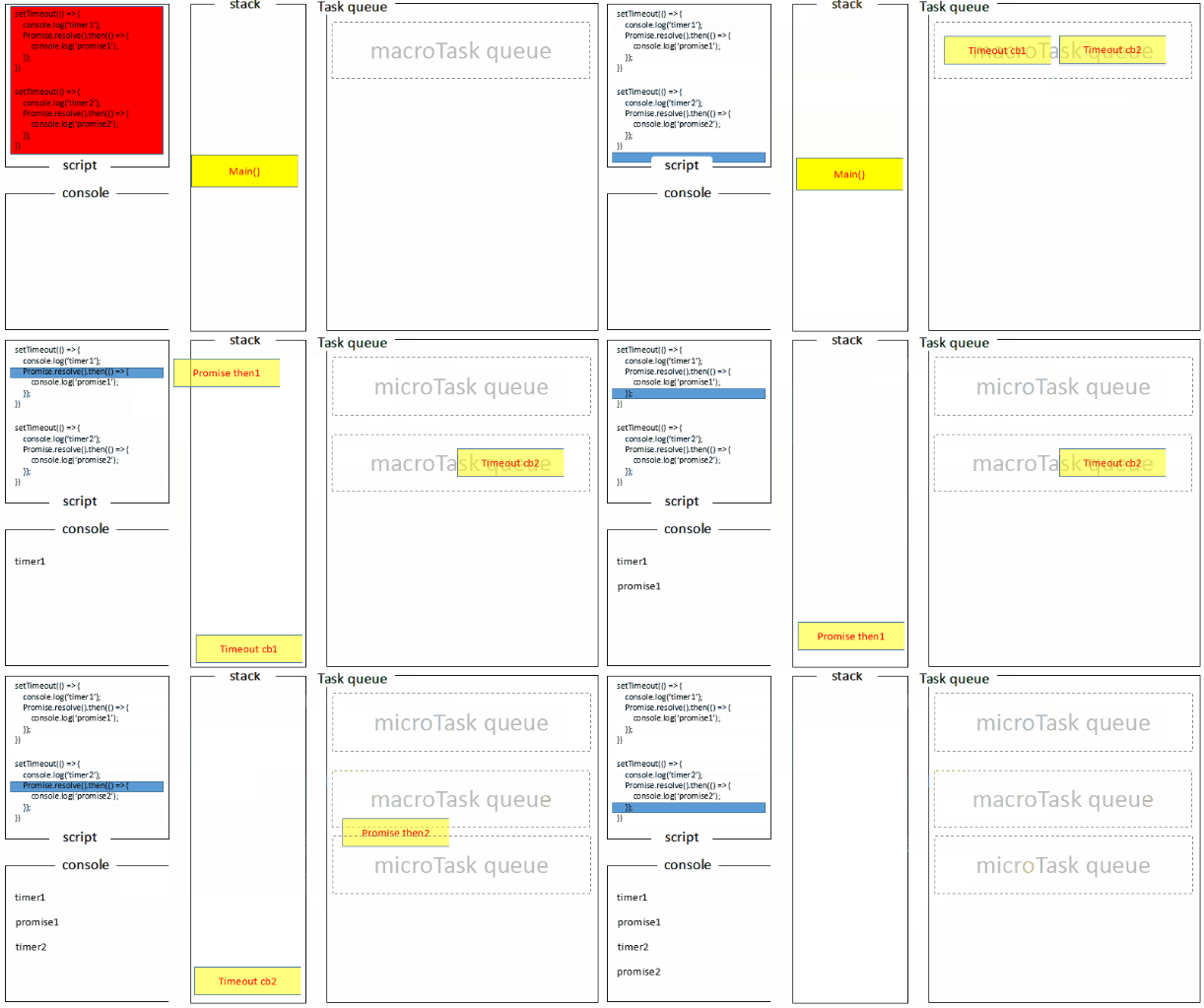
1
2
3
4
timer1
promise1
timer2
promise2
The node side (v10.15.1) runs the result ![node-side run results:] (/assets/img/2019/02/eventloop-node.gif)
1
2
3
4
timer1
timer2
promise1
promise2
- The global script (main()) is executed, and the two timers are put into the timer queue one after another. After main() is executed, the call stack is free, and the task queue is started. 2;
- first enter the timers phase, execute the callback function of timer1, print timer1, and put the promise1.then callback into the microtask queue, the same steps to execute timer2, print timer2. 3. so the timer stage, the timer1.then callback into the microtask queue, the timer1.then callback into the microtask queue;
- At this point, the timer phase is finished, and before the event loop enters the next phase, all tasks in the microtask queue are executed, printing promise1 and promise2 in turn.
In the new version of node (v11), the execution results become consistent with the browser:
1
2
3
4
timer1
promise1
timer2
promise2
For details, see pwned by node’s eventloop again, this time it’s node’s pot
Reference
- Tasks, microtasks, queues and schedules
- Faster Asynchronous Functions and Promise
- The Node.js Developer’s Guide.
- The Node.js Event Loop, Timers, and process.nextTick()
- Figuring out Event Loop once and for all
- Don’t confuse event loops in nodejs and browsers
- [What’s the difference between Event Loop in browser and Node?”] (https://www.cnblogs.com/fundebug/p/diffrences-of-browser-and-node-in-event-loop.html)
- Pitted by node’s eventloop again, this time it’s node’s pot