Front-end webassembly + web worker video frame capture
0 background
In the current business scenario, the user uploads a video. After the video is uploaded successfully, the frame capture service will be run in the background, and finally the picture will be returned as a recommended cover and displayed to the user. After the video is uploaded successfully, the frame capture service will be run in the background, and finally the picture will be returned as a recommended cover and displayed to the user. This solution requires waiting for the video to be After the video is uploaded successfully, the frame capture service will be run in the background, and finally the picture will be returned as a recommended cover and displayed to the user.
Therefore, consider using the front end to capture frames and generate recommended covers when uploading videos to improve user experience.
1 Comparison of plans
1.1 canvas Cut frame
use <video>Tag play video, reuse videoObject.currentTime=secondsSet to play at a specified time, and finally <canvas>to draw pictures. There is a relatedopen source library, you can experience itdemo.
but,<video>Supports limited video packaging formats,only MP4, WebM and Ogg. This is inconsistent with the logic of the existing business network. Formats such as mov and flv cannot be uploaded and cannot meet the online standards.
This is inconsistent with the logic of the existing business network. canvas-video

1.2 Webassembly Cut frame
Written in powerful C/C++ffmpeg, packaged into the form of wasm + js through the emscripten compiler, and then use js to implement the video frame capture function.
In terms of compatibility,WebassemblyHas support from all major browsers but only some browsers still don’t support it, using the old scheme for browsers that are not supported. using the old scheme for browsers that don’t support it.
This solution has been put into practice on platforms such as Station B, and there are relevant implementations for reference. Finally decided to use this This solution has been put into practice on platforms such as Station B, and there are relevant implementations for reference.
1.3 WebassemblyImplementation comparison of frame capture
1.3.1 ffmpeg.wasm
Currently, there are open source librariesffmpeg.wasm. The library includes.
@ffmpeg/core: Compile ffmpeg to generate ffmpeg-core.wasm + js glue code.
@ffmpeg/ffmpeg: Implements the part of calling the glue code generated in the previous step, and provides load, run and other APIs. provides load, run and other APIs. At the same time, if developers are not satisfied with @ffmpeg/core, they can also build a custom ffmpeg-core.wasm.
 So, can it be used directly? These issues remain to be resolved.
- Browser compatibility: We know that the browser’s js thread is single-threaded and mutually exclusive with the rendering thread. In order not to block the rendering of the page and the js main thread,
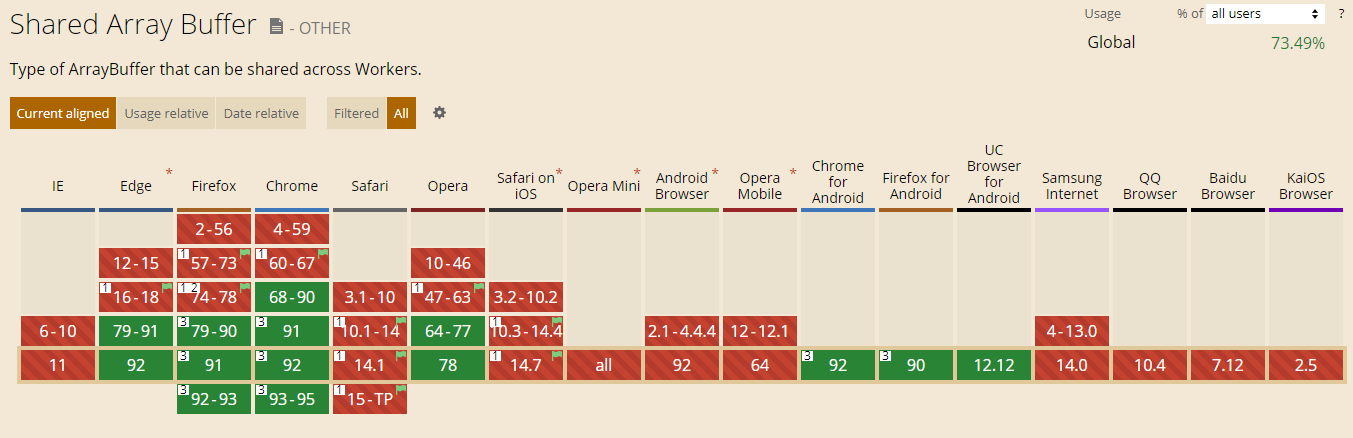
@ffmpeg/coreWhen compiling ffmpeg, configure multithreading, resulting in the generated js glue code being usedsharedarraybuffer. [«>>](https://developer.mozilla.org/zh-CN/docs/Web/JavaScript/Reference/Global_Objects/SharedArrayBuffer) It can meet the It can meet the data sharing between the main thread and workers, and can also meet the data sharing between multiple workers. It is ideal for use in this scenario. Because of [security issues](https://meltdownattack.com/), all mainstream browsers are disabled by default, and some additional return header fields need to be configured, and [less than ideal support](https://caniuse.com/?search=sharedarraybuffer), cannot meet the online standard.
- wasm redundancy:
@ffmpeg/corecompiledffmpeg-core.wasmIncludes almost all functions of ffmpeg, fileThe size is 24MB (8.5MB after gzip), a lot of which is not needed for frame capture.
1.3.2 Implementation of other platforms
According to business requirements (there are relatively few supported formats), by customizing ffmpeg, the size of the final wasm file generated can be reduced to 4.7MB (can be smaller after gzip).
However, I maintain a C language entry file myself, use the internal library provided by FFmpeg to implement the frame capture function, and then compile ffmpeg.
This method tests the understanding of FFmpeg and is bound to a specific version of ffmpeg. As the version of FFmpeg is upgraded, the API and directory of ffmpeg may change. In addition, as the business develops, we may need to modify this C code when we use more functions of ffmpeg, which has low maintainability. maintainability.
1.4 Summary
Therefore, the final solution adopted is to use Webassembly to capture frames, and the specific implementation is.
Customize compilation of ffmpeg and optimize wasm file size.
Use the fftools/ffmpeg.c entry file provided by ffmpeg (v4.3.1) without writing C code yourself.
Compile without
sharedarraybufferffmpeg-core.wasm+js, and finally use the web worker to run the business code related to frame capture to prevent blocking the main thread. 4.Call the js glue code of ffmpeg generated by compilation to realize the frame capture function. This part can be used
@ffmpeg/ffmpeg.
2 Customize compilation of ffmpeg
2.1 Run docker using the official emscripten environment
emscripten is a WebAssembly compiler toolchain.
downloadDocker Desktop,passRun dockerThe method uses the already built Emscripten environment to avoid the pitfalls of the local development environment.
Mac’s Docker Desktop always fails to connect. It has been tested that running docker commands on Windows’ Ubuntu is more stable.
In the ffmpeg source directory, write the script to run docker as follows.
1
2
3
4
5
6
7
8
9
10
11
12
#!/bin/bash
set -euo pipefail

EM_VERSION=2.0.8

docker pull emscripten/emsdk:$EM_VERSION
docker run \
  --rm \
  -v $PWD:/src \ # 绑定挂载
  -v $PWD/wasm/cache:/emsdk_portable/.data/cache/wasm \
  emscripten/emsdk:$EM_VERSION \
  sh -c 'bash ./build.sh'
2.1.1 Understand the principle of emscripten
Specifically, languages such as C/C++ are transformed into LLVM intermediate code (IR) through the clang front-end, and then from LLVM IR to wasm. Then the browser downloads WebAssembly, and then passes through the WebAssembly module first, then to the assembly code of the target machine, and then to the machine code (x86/ARM, etc.). target machine, and then to the machine code (x86/ARM, etc.).
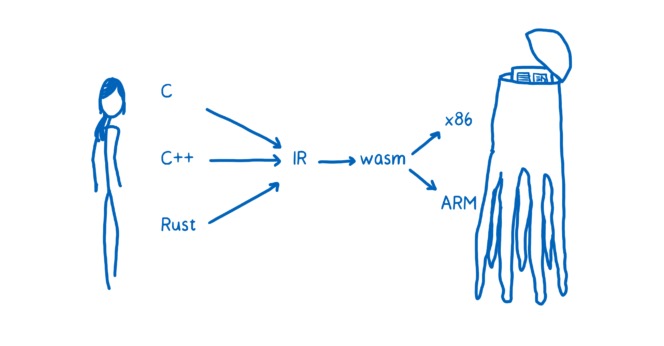
So, what are LLVM and Clang?
LLVM means that different front-end and back-end use unified intermediate code LLVM Intermediate Representation (LLVM IR).
Clang is a sub-project of LLVM, a C/C++/Objective-C compiler front-end based on the LLVM architecture.
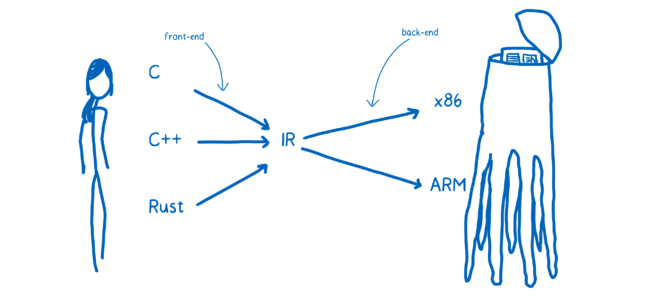
- Frontend: lexical analysis, syntax analysis, semantic analysis, intermediate code generation
- Optimizer: intermediate code optimization (loop optimization, deletion of useless code, etc.).
- Backend: generate target code. If the object code is absolute instruction code (machine code), such object code can be executed immediately. If the object code is absolute instruction code (machine code), such object code can be executed immediately. If the target code is assembly instruction code, it needs to be compiled by an assembler (generating machine code) before it can be run.
The next step is to write the compiled script build.sh.
2.2 Configure ffmpeg compilation parameters and remove redundancy
ffmpeg is an excellent C/C++ audio and video processing library that can realize video screenshots.
First, we need to know the libraries and components involved in implementing screenshots.
Libraries involved:
- libavcodec: audio and video encoding and decoding.
- libavformat: audio and video encapsulation and decapsulation.
- libavutil: A library that contains some public utility functions, including arithmetic operations, character operations, etc. * libswscale: Image scaling and pixel format conversion.
- libswscale: Image scaling and pixel format conversion.
Components involved:
- demuxer: Decapsulate video
- decoder: Decode the video
- encoder: After getting the decoded frame, output the picture encoding
- muxer: image packaging
use[«
Documentation about configuration.
run
emconfigure . /configure --helpView all available configurations.For detailed instructions on FFMPEG configuration, please click hereCheck.
1
2
3
4
5
6
7
8
9
10
11
12
13
14
15
16
17
18
19
20
21
22
23
24
25
26
27
28
29
30
31
32
33
34
35
36
37
38
39
40
41
# configure FFMpeg with Emscripten
emconfigure ./configure
  --target-os=none        # use none to prevent any os specific configurations
  --arch=x86_32           # use x86_32 to achieve minimal architectural optimization
  --enable-cross-compile  # enable cross compile
  --disable-x86asm        # disable x86 asm
  --disable-inline-asm    # disable inline asm
  --disable-stripping     # disable stripping
  --disable-programs      # disable programs build (incl. ffplay, ffprobe & ffmpeg)
  --disable-doc           # disable doc
  --nm="llvm-nm"
  --ar=emar
  --ranlib=emranlib
  --cc=emcc
  --cxx=em++
  --objcc=emcc
  --dep-cc=emcc
  # 去掉不需要的库
  --disable-avdevice
  --disable-swresample
  --disable-postproc
  --disable-network
  --disable-pthreads
  --disable-w32threads
  --disable-os2threads
  # 配置需要的解封装,编解码器等
  --disable-everything # 减少wasm体积的关键,除了以下的组件外的个别组件都disable
  --enable-filters
  --enable-muxer=image2
  --enable-demuxer=mov # mov,mp4,m4a,3gp,3g2,mj2
  --enable-demuxer=flv
  --enable-demuxer=h264
  --enable-demuxer=asf
  --enable-encoder=mjpeg
  --enable-decoder=hevc
  --enable-decoder=h264
  --enable-decoder=mpeg4
  --enable-protocol=file

# build dependencies
emmake make -j4
2.4 Generate js+wasm
use emccCompile the link code generated by make in the previous step into JavaScript + WebAssembly. use here fftools/ffmpeg.cAs an entry file, you do not need to maintain a C language entry file yourself.
Passable emcc --helpCheckemcc parameter options, and through clang --helpCheckemcc parameter options, and through clang --helpCheckemcc parameter options. help`Checkclang parameter options.
1
2
3
4
5
6
7
8
9
10
11
12
13
14
15
16
17
18
emcc
  -I. -I./fftools # Add directory to include search path
  -Llibavcodec -Llibavdevice -Llibavfilter -Llibavformat -Llibavresample -Llibavutil -Llibpostproc -Llibswscale -Llibswresample # Add directory to library search path
  -Qunused-arguments # Don't emit warning for unused driver arguments.

  -o wasm/dist/ffmpeg-core.js # output
  fftools/ffmpeg_opt.c fftools/ffmpeg_filter.c fftools/ffmpeg_hw.c fftools/cmdutils.c fftools/ffmpeg.c # input
  -lavdevice -lavfilter -lavformat -lavcodec -lswresample -lswscale -lavutil -lm # library
  -s USE_SDL=2 # use SDL2
  -s MODULARIZE=1 # use modularized version to be more flexible
  -s EXPORT_NAME="createFFmpegCore" # assign export name for browser
  -s EXPORTED_FUNCTIONS="[_main]" # export main and proxy_main funcs
  -s EXTRA_EXPORTED_RUNTIME_METHODS="[FS, cwrap, ccall, setValue, writeAsciiToMemory]" # export extra runtime methods
  -s INITIAL_MEMORY=33554432 # 33554432 bytes = 32MB
  -s ALLOW_MEMORY_GROWTH=1 # allows the total amount of memory used to change depending on the demands of the application
  -s ASSERTIONS=1 # for debug
  --post-js wasm/post-js.js # emits a file after the emitted code. use to expose exit function
  -O3 # optimize code and reduce code size
The size of the final built ffmpeg-core.wasm is 5MB, and it will be smaller after gzip.
Source code:build.sh
At this point, compiling ffmpeg is completed! Next, return to the front-end area we are familiar with.
3 Implement frame-cutting function
3.1 Call js glue code
Regarding this part of calling js glue code, in the open source library @ffmpeg/ffmpeghas been implemented, we can simply use its API.
1
2
3
4
5
6
7
8
9
10
11
12
const { createFFmpeg } = require('@ffmpeg/ffmpeg');
const ffmpeg = createFFmpeg({ log: true });

(async () => {
  await ffmpeg.load();
  // ... 省略获取时长duration部分
  const frameNum = 8;
  const per = duration / (frameNum - 1);
  for (let i = 0; i < frameNum; i++) {
    await ffmpeg.run('-ss', `${Math.floor(per * i)}`, '-i', 'example.mp4', '-s', '960x540', '-f', 'image2', '-frames', '1', `frame-${i + 1}.jpeg`);
  }
})();
During this period, we also discovered -ssput on -iBefore, you can intercept frames at a specified time without waiting to read frame by frame, which can improve the screenshot speed. You can view related API documentation.

P.S. @ffmpeg/ffmpegLoading and removing is not currently supported.pthreadsffmpeg-core.wasm+js has also been mentioned for this library.[pr] (https://github.com/ffmpegwasm/ffmpeg.wasm/pull/235).
3.1.1 Exchanging data between JavaScript and C
ThatloadandrunHow is the method implemented? The first thing to understand here is that, when JavaScript and C exchange data, you can only use Number as a parameter. Because from a language perspective, JavaScript and C/C++ have completely different data systems, and Number is the only intersection between the two, so essentially when they call each other, they are exchanging Number.
Therefore, if the parameter is a non-Number type such as a string or array, it needs to be split into the following steps.
- use
Module._malloc()existModuleto allocate memory in the heap and obtain the address ptr. - Copy string/array and other data into the ptr of memory.
- Use ptr as a parameter to call the C/C++ function for processing; * use `Module._Module.
- use
Module._free()Release ptr.
The following is [«
1
2
3
4
5
6
7
8
9
10
11
12
13
14
15
16
17
18
19
20
21
22
23
24
25
26
27
28
29
30
31
32
const createFFmpegCore = require('path/to/ffmpeg-core.js');
let ffmpeg;

// 加载
const load = async () => {
  Core = await createFFmpegCore({
    print: (message) => {},
  });
  ffmpeg = Core.cwrap('_main', 'number', ['number', 'number']); // cwrap调用导出的主函数
};

const parseArgs  = (Core, args) => {
  const argsPtr = Core._malloc(args.length * Uint32Array.BYTES_PER_ELEMENT);
  args.forEach((s, idx) => {
    const buf = Core._malloc(s.length + 1);
    Core.writeAsciiToMemory(s, buf);
    Core.setValue(argsPtr + (Uint32Array.BYTES_PER_ELEMENT * idx), buf, 'i32');
  });
  return [args.length, argsPtr]; // [数组的长度, 数组的ptr]
};

// 执行ffmpeg命令
const run = (..._args) => {
  return new Promise((resolve) => {
    ffmpeg(...parseArgs(Core, _args)); // 传入命令参数
  });
};

module.exports = {
  load,
  run,
};
4 web worker
Because there is no configuration in the build-s USE_PTHREADS=1, called above ffmpegThe method will block the js main thread and the rendering of the page. For example, while generating recommended covers, the progress status of uploaded videos cannot be updated, and users cannot respond when For example, while generating recommended covers, the progress status of uploaded videos cannot be updated, and users cannot respond when clicking other buttons on the page.
Web Worker is a script that runs on a thread separate from the browser page thread and can be used to run a web worker. separate from the browser page thread and can be used to offload almost any heavy processing from the page thread. The main thread and workers can pass postMessage() to the browser page thread. postMessage()method and onmessage`Communicate events.
It is recommended to use Comlink(1.1kB), making the code more friendly and making communication imperceptible.
For example, frame interception communication.
main.js
1
2
3
4
5
import * as Comlink from 'Comlink';
async function onFileUpload(file) {
  const ffmpegWorker = Comlink.wrap(new Worker('./worker.js'));
  const frameU8Arrs = await ffmpegWorker.getFrames(file);
}
worker.js
1
2
3
4
5
6
7
8
9
10
11
12
13
14
15
16
17
18
19
20
21
22
23
import * as Comlink from 'Comlink';
async function getFrames(file) {
  // ...

// 先获取时长duration等
  const frameNum = 8;
  const per = duration / (frameNum - 1);
  let frameU8Arrs = [];
  for (let i = 0; i < frameNum; i++) {
    await ffmpeg.run('-ss', `${Math.floor(per * i)}`, '-i', 'example.mp4', '-s', '960x540', '-f', 'image2', '-frames', '1', `frame-${i + 1}.jpeg`);
  }
  // 从MEMFS获取图片二进制数据Uint8Array
  for (let i = 0; i < frameNum; i++) {
    const u8arr = await ffmpeg.FS('readFile', `frame-${i + 1}.jpeg`);
    frameU8Arrs.push(u8arr);
    ffmpeg.FS('unlink', fileName);
  }
  return frameU8Arrs;
}

Comlink.expose({
  getFrames,
});
Comlinkis based on Es6ProxyandpostMessage()RPC implementation. In the example,ffmpegWorkeris an object located in worker.js. What is obtained in main.js is just ffmpegWorkerThe handle of the ontology, in fact ffmpegWorker.getFramesThe execution of other methods is also run on worker.js.
The only pitfall is this library output is es6 code, and also need to be converted to es5 code through build configuration.
4.1 webpack configuration
In addition, if you use webpack, you may also encounter failure to load the correct worker.js Path problem. It can be configured like this [«
1
2
3
4
5
6
7
8
9
10
11
12
const WorkerPlugin = require('worker-plugin');
const isPub = true; // 是否生产环境
{
  // ...

plugins: [
    new WorkerPlugin({
      globalObject: 'this',
      filename: isPub ? '[name].[chunkhash:9].worker.js' : '[name].worker.js',
    }),
  ],
}
5 online effect
After going online, for browsers that support this solution, users can select and edit video covers without waiting for the video to be uploaded.
Moreover, compared with capturing the frame after reading the video in the background, the time taken to capture the frame on the front end is also greatly reduced. This is more noticeable with larger videos.
6 subsequent optimization points
6.1 Improve browser support rate
After reporting errors in some browsers, we will continue to optimize and improve browser support. (For example, a certain version of Safari reports an error in fetch wasm).
6.2 Reduce wasm file size
There is still room for reduction in the size of wasm. (If configured in the compilation configuration enable-filters All filters used).
6.3 Optimization of reading video files
Because MEMFS is used by default, the entire video file will be stored in memory and then processed. For large video files, such as 800MB+ video files, in the For large video files, such as 800MB+ video files, in the Firefox 90 version, the memory usage will be close to 3G when running tasks, and the browser will crash.
1
2
3
4
5
6
const getVideoInfo = async (file) => {
  // ...先实现fileToUint8Array方法
  const bufferArr = await fileToUint8Array(file);
  ffmpeg.FS('writeFile', 'example.mp4', bufferArr); // 先保存到MEMFS
  await ffmpeg.run('-i', 'example.mp4', '-loglevel', 'info');
}

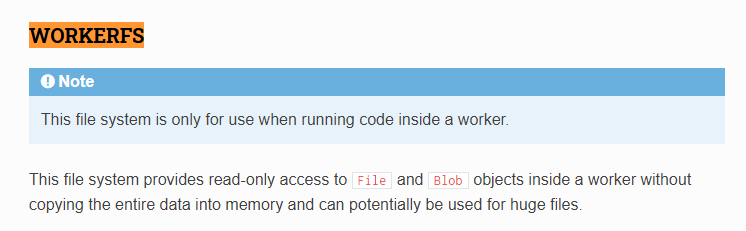
The current solution that comes to mind is to use WORKERFS. WORKERFS runs in a Web Worker and provides read-only access to the File and Blob objects inside the worker without copying the entire data to memory, which meets our needs.