koa study notes
Prepare
Koa is a Web framework. Built by the original Express team , koa, is committed to become a smaller , more robust , more expressive Web framework. Using koa to write web applications , through the combination of different generator , you can avoid the repetition of tedious callback function nesting , and greatly improve the efficiency of common error handling . koa is not bundled with any middleware , it only provides a lightweight and elegant function library , making the writing of Web applications become easy .
Koa is a new web framework designed by the team behind Express, which aims to be a smaller, more expressive, and more robust foundation for web applications and APIs. Through leveraging generators Koa allows you to ditch callbacks and greatly increase error-handling. Koa does not bundle any middleware within core, and provides an elegant suite of methods that make writing servers fast and enjoyable.
Koa requires node 7.6.0+ to support ES6 and the async method.
Hello World
Here is an example from the official website
1
2
3
4
5
6
7
8
const Koa = require('koa')
const app = new Koa()

// 中间件
app.use(async (ctx, next) => {
  ctx.body = 'Hello World'
})
app.listen(3000)
Koa applications
The object created during the execution of new Koa() is called a Koa application object. The application object is the Koa interface with node http services. It handles middleware registration, distributes http requests to the middleware, does default error handling, and responds to context, request, and response objects for configuration. The code above sets up an http service listening on port 3000.
Middleware
Koa is a middleware framework that allows two different approaches to implementing middleware:
- async function
- common function
The above code uses async function (node v7.6+). Middleware usually comes with two arguments (ctx, next), ctx is a context for the request, next is a call to a function that executes the downstream middleware, and returns a Promise via the then method when the code execution is complete.
Cascade code
Koa middleware is cascaded in a very traditional way, as in the example below, with the code executed in the order as commented.
1
2
3
4
5
6
7
8
9
10
11
12
13
14
15
16
17
18
19
20
21
22
23
24
25
26
27
28
29
30
31
const Koa = require('koa')
const app = new Koa()

// x-response-time
app.use(async (ctx, next) => {
  // (1) 进入路由
  const start = Date.now()
  await next()
  // (5) 再次进入 x-response-time 中间件,记录2次通过此中间件「穿越」的时间
  const ms = Date.now() - start
  ctx.set('X-Response-Time', `${ms}ms`)
  // (6) 返回 ctx.body
})

// logger
app.use(async (ctx, next) => {
  // (2) 进入 logger 中间件
  const start = Date.now()
  await next()
  // (4) 再次进入 logger 中间件,记录2次通过此中间件「穿越」的时间
  const ms = Date.now() - start
  console.log(`${ctx.method} ${ctx.url} - ${ms}`)
})

// response
app.use(async ctx => {
  // (3) 进入 response 中间件,没有捕获到下一个符合条件的中间件,传递到 upstream
  ctx.body = 'Hello World'
})

app.listen(3000)
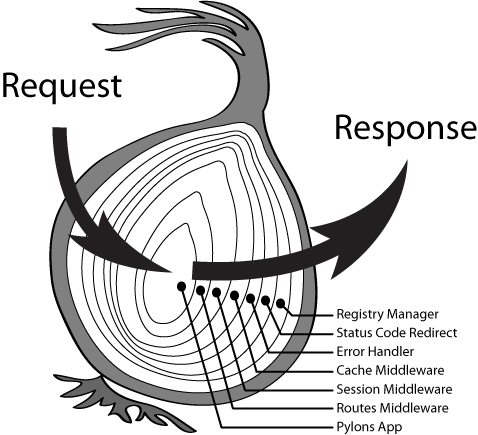
At first, the user’s request goes through the x-response-time and logger middleware. These two middlewares log some details of the request. Then it “passes through” the response middleware once, eventually ending the request and returning “Hello World”. When the program reaches await next(), the code stream will pause the execution of this middleware for the rest of the code, and switch to the next defined middleware to execute the code, this way of switching control is called downstream, when there is no next middleware to execute downstream, the code will be executed in reverse order (back to await next() to execute the code). ()` to execute the next line).
Many of you may have heard the term “cascade” in CSS, but if you don’t understand why it’s used here, think of this routing structure as the LESS way of writing inheritance nesting. The following “onion” diagram can be more graphically expressed. The user’s request passes through login management, status code redirection, error handling, cache middleware, session middleware, routes routing middleware, and the application. The response is passed through these steps in reverse.
Context (content)
Each middleware accepts a Koa Context object. The Context encapsulates the node’s request and response objects into a single object. The ctx is typically used as the parameter name of the context object.
ctx.request
Koa provides a Request object as the request property of Context, ctx.request. Koa’s Request object provides methods for handling http requests that are delegated to the node http module’s IncomingMessage. Below is an example of checking for xml support on the requesting client.
1
2
3
4
5
6
app.use(async (ctx, next) => {
  ctx.assert(ctx.request.accepts('xml'), 406);
  // 相当于:
  // if (!ctx.request.accepts('xml')) ctx.throw(406);
  await next();
})
ctx.response
Koa provides a Response object as the response property of Context, ctx.response. Koa’s Response object provides methods for processing http responses delegated to ServerResponse. Below is an example of streaming a file as a response body (returning a page) using Koa’s Response object.
1
2
3
4
5
app.use(async (ctx, next) => {
  await next()
  ctx.response.type = 'html'
  ctx.response.body = fs.createReadStream('index.html')
})
For more detailed APIs, see Request API Reference, Response API Reference and Context API Reference.
koa-router
koa-router is koa’s routing middleware. You can start by looking at a comparison of the basic usage of native routing and koa-router.
1
2
3
4
5
6
7
8
9
// 原生路由
app.use(async ctx => {
  if (ctx.request.path !== '/') {
    ctx.response.type = 'html';
    ctx.response.body = '<a href="/">Index Page</a>';
  } else {
    ctx.response.body = 'Hello World';
  }
})
1
2
3
4
5
6
7
8
9
10
11
12
13
14
15
// koa-route
const router = require('koa-router');

router
  .get('/', ctx => {
    ctx.response.body = 'Hello World'
  })
  .get('/about', ctx => {
    ctx.response.type = 'html'
    ctx.response.body = '<a href="/">Index Page</a>'
  })

app
  .use(router.routes())
  .use(router.allowedMethods())
router.get|put|post|patch|delete|del ⇒ Router
1
2
3
4
5
6
7
8
9
10
11
12
13
14
15
16
17
router
  .get('/', function (ctx, next) {
    ctx.body = 'Hello World!';
  })
  .post('/users', function (ctx, next) {
    // ...
  })
  .put('/users/:id', function (ctx, next) {
    // ...
  })
  .del('/users/:id', function (ctx, next) {
    // ...
  })
  // router.all() can be used to match against all methods
  .all('/users/:id', function (ctx, next) {
    // ...
  })
Multiple middleware
1
2
3
4
5
6
7
8
9
10
11
12
13
router.get(
  '/users/:id',
  function (ctx, next) {
    return User.findOne(ctx.params.id).then(function(user) {
      ctx.user = user;
      return next();
    });
  },
  function (ctx) {
    console.log(ctx.user);
    // => { id: 17, name: "Alex" }
  }
)
Nested routes
1
2
3
4
5
6
7
8
9
10
11
12
13
const forums = new Router()
const posts = new Router()
posts
  .get('/', function (ctx, next) {
    // ...
  })
  .get('/:pid', function (ctx, next) {
    // ...
  })
forums.use('/forums/:fid/posts', posts.routes(), posts.allowedMethods())

// responds to '/forums/123/posts' and '/forums/123/posts/123'
app.use(forums.routes())
Routing prefixes
1
2
3
4
5
6
const router = new Router({
  prefix: '/users'
})

router.get('/', ...) // responds to '/users'
router.get('/:id', ...) // responds to '/users/:id'
URL parameters
Named route parameters are captured and added to the ctx.params
1
2
3
4
router.get('/:category/:title', (ctx, next) => {
  console.log(ctx.params)
  // => { category: 'programming', title: 'how-to-node' }
})
For more information about koa-router see koa-router.