php study notes of the actual combat small demo
Preface
It’s been almost two months since I wrote a blog! I’ve been learning the back-end of things, so I’m using this post as a record, which is also a way to urge myself to learn and accumulate.
Make CAPTCHA with GD library
Here is the address for the experience:
- General CAPTCHA: https://119.29.142.213/captcha/form.php
- Image CAPTCHA: https://119.29.142.213/captcha/imgCaptcha/form.php
- Chinese CAPTCHA: https://119.29.142.213/captcha/cnCaptcha/form.php
Main idea:
- use the GD library to draw the authentication code, interference point and interference line, mainly use imagecreatetruecolor, imagecolorallocate, imagefill, imageestring, imagesetpixel, imageline and other API. 2.
- the authentication code in $_SESSION[‘authcode’], use imagepng() to output the drawn image to the browser in PNG format.
- Write the front-end interface in form.php, write the path of captcha.php to the src attribute of the
<img>that displays the CAPTCHA image, and realize that after inputting the CAPTCHA and clicking submit, we can jump to form_ok.php. - Compare $_SESSION[‘authcode’] and $_POST[‘authcode’] in form_ok.php to display the message.
- Picture CAPTCHA just writes the random data as an array of pictures and picture names and returns the picture file; Chinese CAPTCHA changes the random data to a string composed of Chinese characters.
Write a cgi
cgi (Common Gateway Interface), the public gateway interface, is the HTTP server and your or other machines on the program to “talk” a tool. The principle of work is this: the browser through the HTML form or other ways to request a CGI application pointing to the URL, the server sends and receives the request to execute the CGI, the results are formatted into a web server and the browser can understand the document such as HTML, json, and finally returned to the browser. cgi can be written in many languages, here written in php and used to the thinkphp framework.
Main idea:
- Create a new MySQL data table with two fields, name and favor, to store the data.
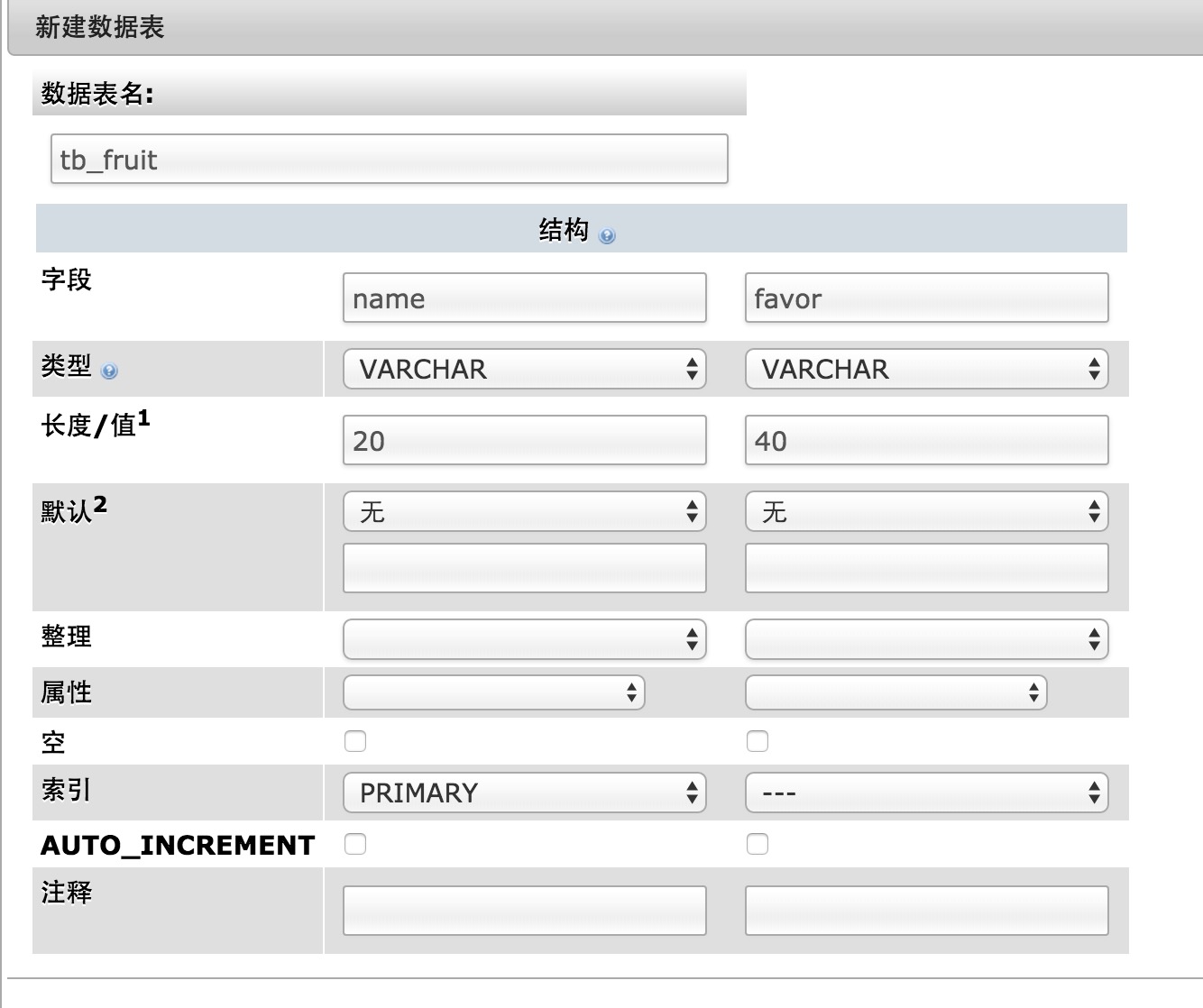
- In Lib/Action/IndexAction.class.php write two methods, respectively create and submit. create returns the data of the drop-down list and the default selected value of the drop-down list; submit receives the data transmitted by the browser, writes it to the table, and returns the success message.
1
2
3
4
5
6
7
8
9
10
11
12
13
14
15
16
17
18
19
20
21
22
23
24
25
26
27
28
29
30
31
32
33
class IndexAction extends Action {

    public function index(){
        $origin=isset($_SERVER['HTTP_ORIGIN'])?$_SERVER['HTTP_ORIGIN']:'';
        /************** 获取客户端的Origin域名 **************/
        header('Access-Control-Allow-Origin:'.$origin);
        header('content-type:application/json;charset=UTF-8');

        $name = $_POST["name"];
        $favor = $_POST["fruit"];
        $data = array(
          'name' => $name,
          'favor' => $favor
        );
        $tb = M('fruit');
        if($tb->data($data)->add()){
          echo 'success';
        } else {
          echo $_POST['name'];
        }
    }

    public function create(){
        $jsonp = $_GET["callback"];
        $default = "banana";
        $data = array(
            "opts" => array("apple"  => "苹果","banana" => "香蕉","watermelon" => "西瓜"),
            "default" => $default
        );

        echo $jsonp.'('.json_encode($data).')';
    }
}
- Create a new html locally, write a form, and use ajax to send a get request (to get the data to initialize the drop-down list) and a post request (to submit the form).
1
2
3
4
5
6
7
8
9
10
11
<form id="form">
    <h1>表格标题</h1>
    <label>姓名:</label>
    <input type="text" name="name">
    <br/>
    <br/>
    <label>最喜爱的水果:</label>
    <select id="favorSelect" name="fruit">
    </select>
    <input id="submit" type="button" style="display: block; margin: 40px 0 0;" value="提交">
</form>
1
2
3
4
5
6
7
8
9
10
11
12
13
14
15
16
17
18
19
20
21
22
23
24
$(document).ready(function(){
    $.getJSON('https://119.29.142.213/thinkphpdemo/index.php?m=Index&a=create&callback=?', function(data){
        var opts = data['opts'];
        for(val in opts){
            $('#favorSelect').append('<option value="'+val+'">'+opts[val]+'</option>');
        }
        $('#favorSelect').val(data['default']);
    })
});

$('#submit').on('click', function(){
    var data = {};
    var temp = $('#form').serialize().split('&');
    var key, val;
    for (var i=0; i<temp.length; i++){
        key = temp[i].split('=')[0];
        val = temp[i].split('=')[1];
        data[key] = val;
    }
    console.log(data);
    $.post('https://119.29.142.213/thinkphpdemo/', data, function(res){
        console.log(res);
    })
})
P.S. Please don’t mind if I don’t write the style a bit ugly ==