Get to know pnpm - a fast, disk-saving package manager
0 Preface
Currently, the project is built using npm or yarn. By getting to know pnpm, see if you can use pnpm to replace the current package manager and improve the project construction speed.
1 What is pnpm
pnpm, that is, performant npm, high-performance npm. Compared with the current mainstream package managers, pnpm is a package manager that is fast and saves disk space.
2 Performance comparison
The following is provided by the official website Performance Comparison:
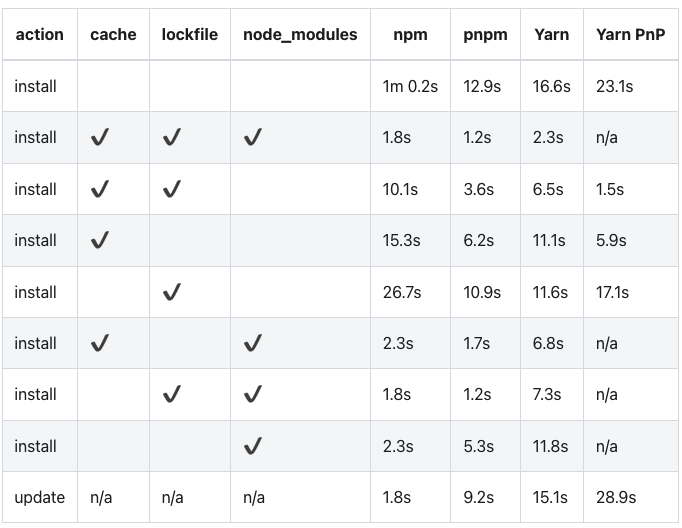
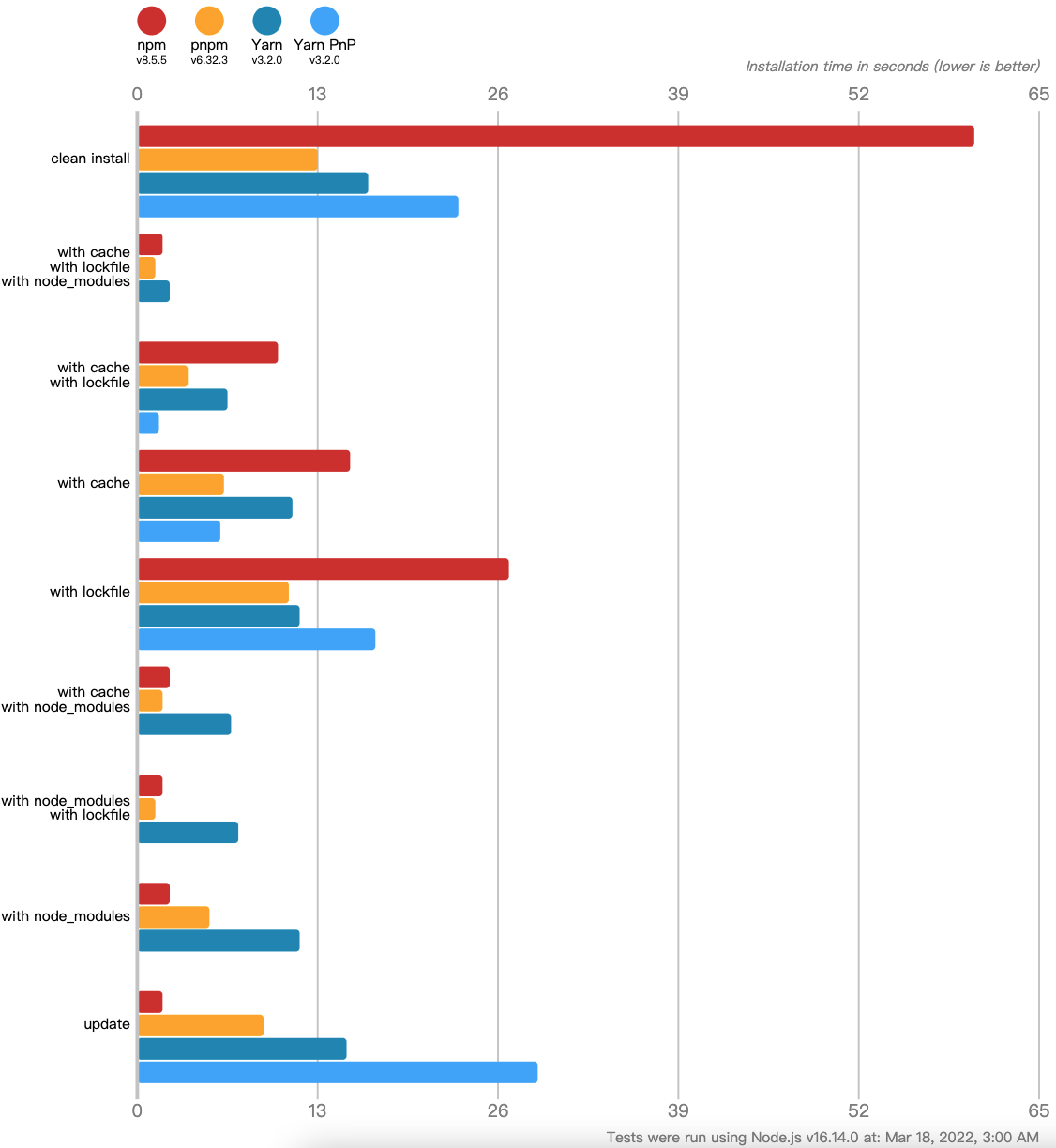
It can be seen that compared with the current mainstream package managers npm and yarn, the installation speed of pnpm has obvious advantages regardless of whether there is cache, lockfile or node_modules.
3 Save disk space and increase installation speed
Why is pnpm so fast? The main reason is that pnpm uses the hard link (hard link) mechanism to save disk space and increase installation speed.
hard link (hard link): Multiple file names point to the same index node (Inode). One of the functions of hard links is to allow a file to have multiple valid path names, so that users can establish hard links to important files to prevent “ accidental deletion” of source data.
When using npm or Yarn, if you have 100 projects, and all projects have the same dependency package, then you need to save 100 copies of the same package ( dependency package) on the hard disk.
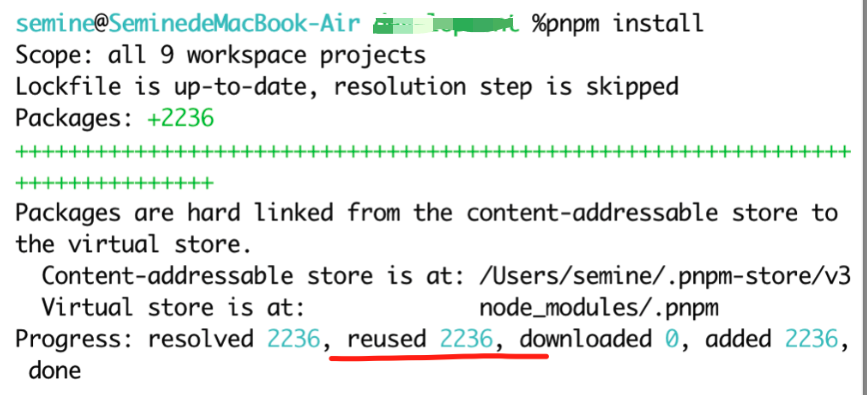
With pnpm, the package will be stored in a unified location (such as Mac ~/.pnpm-store). When a package is installed, all files it contains are hard-linked from this location, taking up no additional hard drive space. This allows you to easily This allows you to easily share the same version of a package between projects. Therefore, there will be no problem of repeatedly installing the same package mentioned above. try pnpm installInstall dependencies, you can see reusedThe same package that has been installed before. The same package that has been installed before. pnpm install When installing a software package with the same name with different versions, only the files that differ between versions will be added to the storage, and all files in the package will not be added to the storage. and all files in the package will not be saved due to the modification of one file. At the same time, this command provides an option, the usage method is:pnpm store prune, which provides a function for deleting some packages that are not referenced by the global project. Developers can use this command to manage existing packages if necessary.
4 node_modules Directory optimization
In addition to saving disk space, another important feature of pnpm is to create non-flat node_modulesdirectory, and find the corresponding one through the sybolic link mechanism when referencing dependencies..pnpmThe address of the directory. Why is this necessary?
4.1 npm@2 Problems
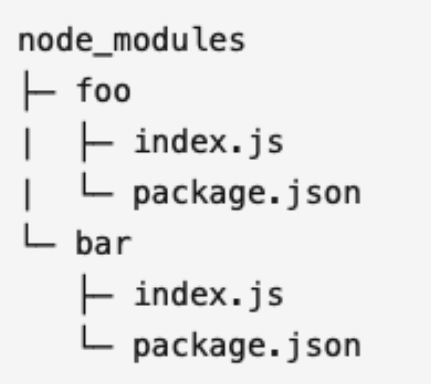
For example, there is a package in the project foo,and fooThere is another package bar, it will look like this: npm@2, npmnode_modulesDirectories are non-flat. bar`, it will look like this: !
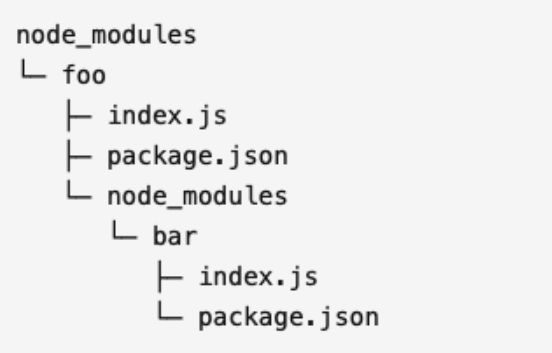
Such a nested installation will have the following problems.
- Packages often create dependency trees that are too deep, which can lead to long directory paths on Windows.
- When a package is required in different dependencies, it will be copied and pasted multiple times and multiple files will be generated, resulting in a large number of dependencies being installed repeatedly.
4.2 npm@3+Problems with yarn
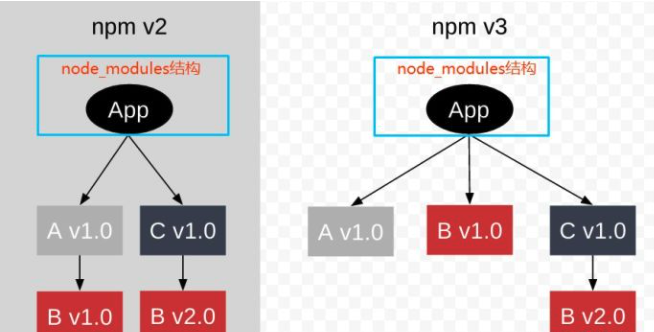
So, in npm@3+ and yarn, through flattening, solve the problem that dependencies cannot be shared and the dependency level is too deep. all dependencies are flattened in node_modulesThe first-level directory in . like.
However, only one of the multiple versions of the package (the one installed first) is promoted, and the other versions of the package will still be nested However, only one of the multiple versions of the package (the one installed first) is promoted, and the other versions of the package will still be nested and installed into their respective dependencies. The above-mentioned problems of too long paths and repeated installations have not been completely The above-mentioned problems of too long paths and repeated installations have not been completely solved. The above-mentioned problems of too long paths and repeated installations have not been completely solved. Flat install comparison
Moreover, upgrading dependent packages will bring about a new problem: Phantom dependencies, that is, the upgraded package is not depended on in package .json, but users can reference this package.
4.3 pnpm solution
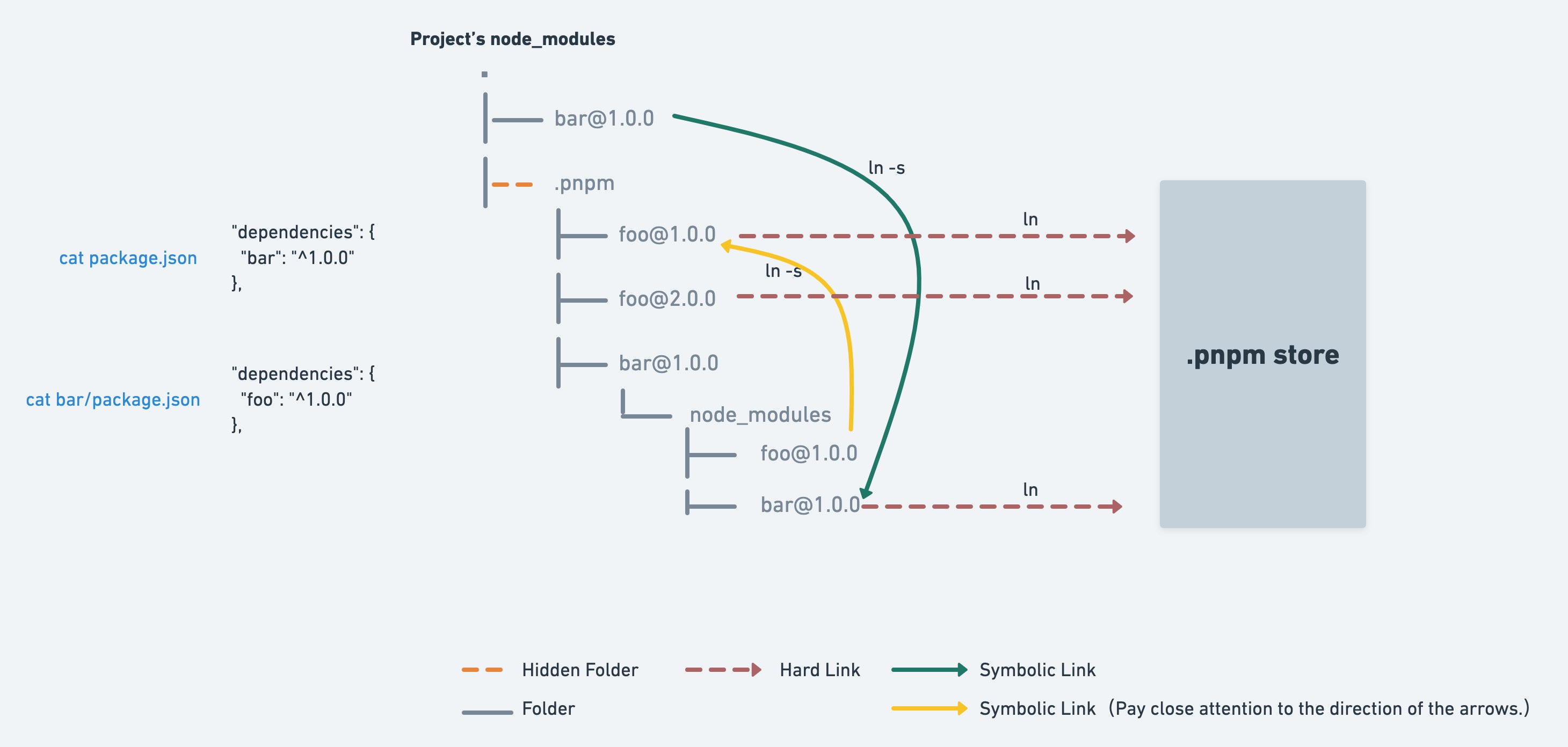
Use pnpm to install dependencies and opennode_modules, we can see,node_modulesThe directory is non-flat (unlikenpm@2same), and at the same time there is one more.pnpmdirectory. andnode_modulesThe dependent packages under are all sybolic link (soft link). same time there is one more .pnpmdirectory. and node_modulesThe dependent packages under are all sybolic link (soft link) and node_modulesThe directory is non-flat (unlike npm@2same, and at the same time there is one more .pnpmdirectory. The dependent packages under are all sybolic link (soft link)
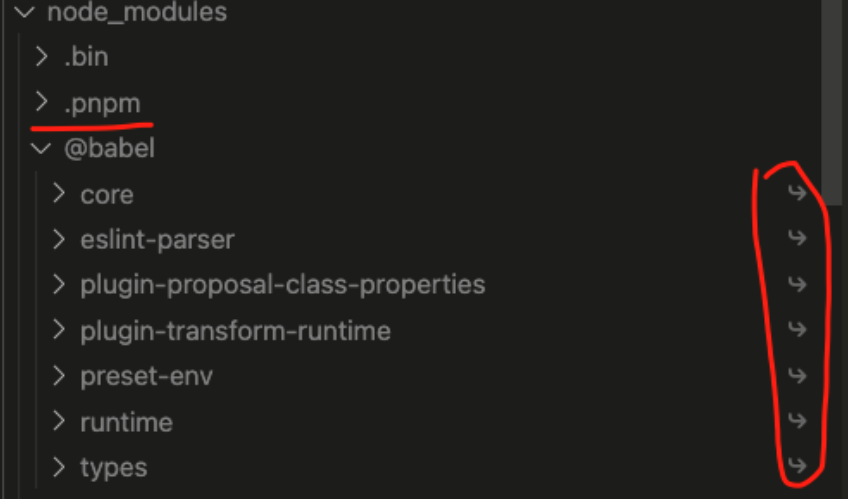
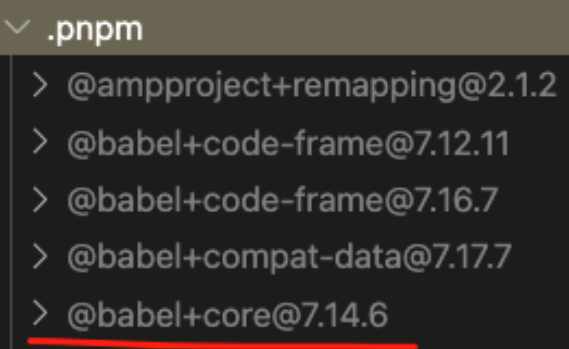
Open .pnpm, you can see,.pnpmAll packages are stored in flat format.node_modulesAll packages in the directory are soft linked to .pnpmBelow the path:.pnpm/<organization-name>+<package- name>@<version>/node_modules/<name>.
sybolic link (soft link, also called symbolic link): similar to the shortcut in the Windows system. Different from the hard link, the soft link is an ordinary file, but the content of the data block is a bit special. Different from the hard link, the soft link is an ordinary file, but the content of the data block is a bit special. The content stored in the file user data block is the path name of another file. The content stored in the file user data block is the path name of another file. In this way, the source file entity pointed to by the soft link can be quickly located.
In this way, pnpm achieves isolation and reuse between different versions of the same module. and,node_modulesDirectories are non-flat and There are no ghost dependency issues due to promotion.
5 Summary
pnpm creates a global store directory for storage through hard link node_modulesDepends on the hard link address inside. This saves disk space and speeds up installation. space and speeds up installation. node_modulesThe directory is non-flat. When referencing dependencies, sybolic link is used to find the corresponding virtual disk directory (.pnpmdirectory) dependent address. In this way, a series of problems caused by previous npm and yarn flat/non-flat installations are avoided.
6 support monorepo
The original project also used monorepo. I wonder if pnpm supports it? The answer is yes, you can check the official website for specific usage methods.documentation
It seems that pnpm can be used instead of the current package manager! Tried it,pnpm installThe time consuming is the original npm ci60%, it is a The time consuming is the original npm ci 60%, it is a worthwhile try!
7 Reference
[Motivation pnpm](https://www.pnpm.cn/motivation) [Benchmarks of JavaScript Package Managers pnpm](https://www.pnpm.cn/benchmarks) - [It’s 2022, pnpm come to the bowl!] (https://zhuanlan.zhihu.com/p/457698236)