Understanding React Native and the underlying framework of applets
This article is a collection of notes and summaries from studying the official development guide for React Native and applets to understand the underlying framework of React Native and applets.
Hybrid App
Before we get into React Native and applets, let’s take a look at Hybrid App.
Strengths
Hybrid App (mixed-mode mobile application) refers to the web-app, native-app between the two apps, both “Native App good user interaction experience advantages” and “Web App cross-platform development advantages “Native App is an app between web-app and native-app.
Native App is a kind of third-party application based on the local operating system of smartphone such as iOS, Android, WP and written and run with native program, also called native app. generally the development language used is JAVA, C++, Objective-C. A Web App is an application that runs on the web and a standard browser, and is developed based on web technology to realize specific functions.
Here is a comparison with Web App and Native App:
| Web App | Hybrid App | Native App | |||||
|---|---|---|---|---|---|---|---|
| Development Costs | Low | Medium | High | ||||
| Maintenance | Simple | Simple | Complicated | Experience | Poor | Simple | Complicated |
| Experience | Poor | Good | Excellent | Great | |||
| Installation | No | Required | Required | Required | |||
| Cross-platform | Good | Good | Bad | Cross-platform |
Technical principles
The essence of Hybrid App is to use WebView as a container to carry Web pages directly in the native App, which is also called “shell”. Among them, the core point is the two-way communication layer between the Native end and the H5 end, which can be understood as we need a set of cross-language communication solutions to complete the communication between Native (Java/Objective-c/…) and JavaScript. JavaScript. This solution is JSBridge, and the key to realize is as a container of WebView, all the principles are based on the WebView mechanism.
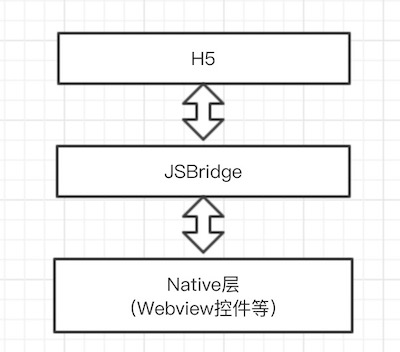
WebView is a webkit engine based , web page display control .
Existing programs
There are three main hybrid solutions that are more popular nowadays, mainly differing in their UI rendering mechanisms:
- WebView UI based on the basic program, most of the mainstream apps on the market have adopted, such as WeChat JS-SDK, through the JSBridge to complete the two-way communication between H5 and Native, so as to give H5 a certain degree of native capabilities. 2.
- based on Native UI programs, such as React-Native, Weex, on the basis of giving H5 native API capabilities, and further through the JSBridge will be resolved into a virtual node tree (Virtual DOM) passed to the Native and use native rendering. 3.
- In addition, there are more recent popular applet program, but also through a more customized JSBridge, and the use of ** dual-threaded ** mode isolates the JS logic and UI rendering, the formation of a special development model to improve page performance and development experience.
The above three programs, in fact, the same are based on JSBridge to complete the communication layer, the second three programs, in fact, can be regarded as in the program on the basis of the first, continue to continue to further improve the degree of mixing of applications through different new technologies.
Next, let’s take a look at the React Native scenario.
The underlying framework for React Native
General framework
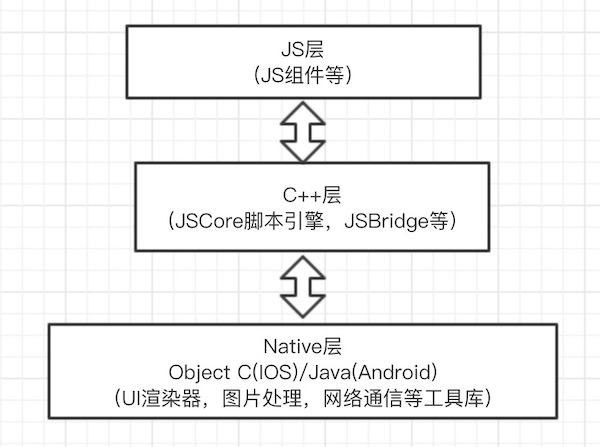
- js layer
This layer provides various components for developers to use as well as some tool libraries (event distribution, etc.).
- C++ layer
Mainly handles java/OC and js communication (JSBridge) and execution of JavaScript (JS script engine).
- Native layer (Object C/Java layer)
It mainly includes tool libraries such as UI renderer and network communication. There are different implementations according to different operating systems.
UI rendering
Because React Native is underpinned by the React Framework, it also embodies the idea of a virtual DOM.
- First the Js layer builds the Component through Virtual Dom written in jsx.
- Native layer will turn it into a real DOM and insert it into the page of the native app.
- When there is a change, generate diff object by diff algorithm. 4.
- Finally, the Native layer applies the diff object to the page elements of the native app.
Virtual DOM implementation ideas:
- use JS object to simulate DOM (virtual DOM)
- turn this virtual DOM into real DOM and insert it into the page (render)
- if an event occurs that modifies the virtual DOM, compare the difference between the two virtual DOM trees, and get the difference object (patch array) (diff)
- apply the diff object (patch array) to the real DOM tree (patch)
The advantage is that it is efficient to alter the DOM and avoids redrawing the DOM.
Communication mechanisms
The main use of JSCore to achieve JS and Object C/Java interaction. The rough steps are as follows:
- Parsing JSX code into javaScript code
- Read JS files and use the utilization of JS script engine execution
- Returns an array that describes the OC/Java object, describes the object properties and the methods that need to be executed, so that the object can be made to set properties and call methods.
JSCore, or JavaScriptCore, the core part of the JS engine. iOS uses the built-in JavaScriptCore, Android uses jsc.so from the https://webkit.org family.
Summary
RN has both the experience of Native, but also can use the front-end developers are familiar with the React framework, and has the advantages of hybrid technology, cross-platform development, can remotely update the code, to improve the iteration frequency and efficiency. But there are still the following shortcomings:
- The styles supported by RN are a subset of CSS, which may not satisfy the growing needs of web developers;
- RN’s existing ability to exist under some unstable problems, such as performance, bugs, etc..
- RN is to leave all the rendering work to the client-side native rendering, will have a closer to the native experience, but in fact some simple interface elements using Web technology rendering can be fully capable of.
Next, let’s look at the two-threaded mode of the applet.
Underlying framework for applets
Two-threaded model
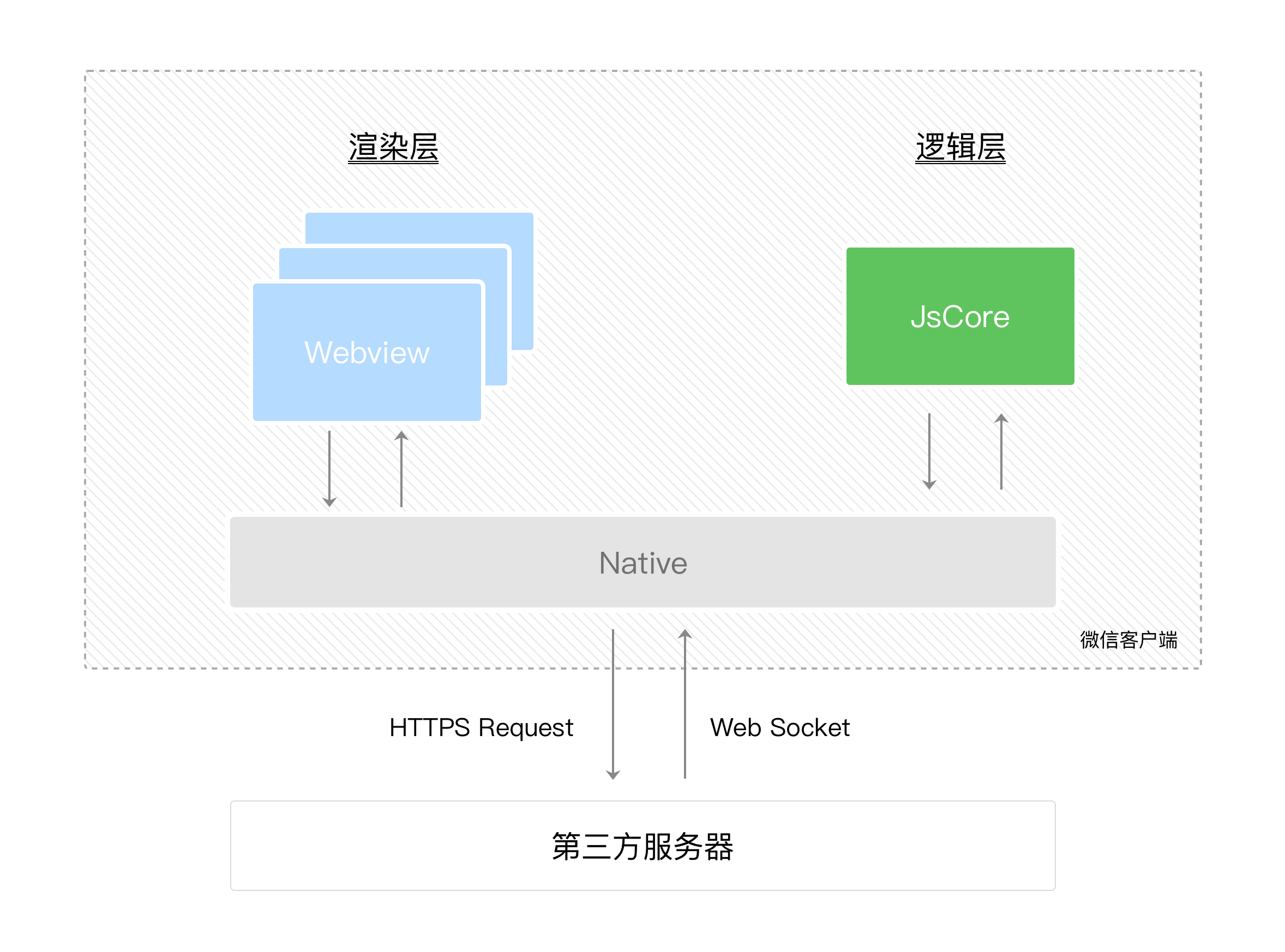
As shown in the figure below, the running environment of the applet is divided into a rendering layer and a logic layer, the WXML templates and WXSS styles work in the rendering layer, and the JS scripts work in the logic layer. The rendering layer and logic layer of the applet are managed by two threads: the rendering layer uses WebView for rendering the interface; the logic layer uses JsCore thread to run the JS scripts. There are multiple interfaces in an applet, so there are multiple WebView threads in the rendering layer. This makes the applet closer to the native experience and avoids overloading a single WebView. The communication between these two threads is relayed through the WeChat client (Native), and the logic layer sends network requests through Native.
Reason
There are two main reasons for the separation of the rendering and logic layers of applets:
- UI rendering and JavaScript script execution in two separate threads, so as to avoid some logic tasks to preempt the resources of UI rendering.
- In order to solve the control and security problems, provide a sandbox environment to run the developer’s JavaScript code (logic layer), so as to prevent the developer from using some browsers, such as jumping to the page, manipulating the DOM, dynamically executing scripts of the open interface. For more information, see Control and Security on the official website.
- The separation of the rendering and logic layers also gives the possibility to run in different environments (applet vs. applet developer tools).
UI rendering
Like RN, applets embody the idea of virtual DOM in page rendering.
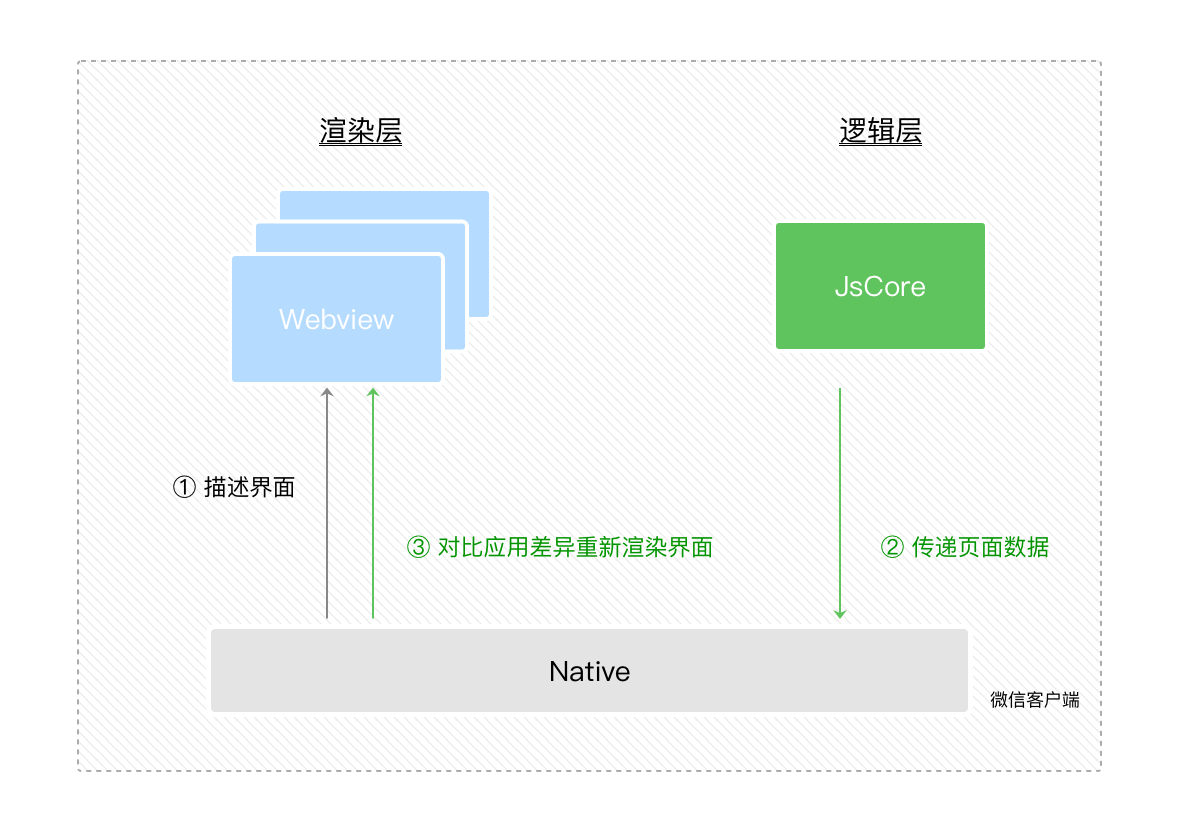
- First of all, in the rendering layer, the host environment will convert the WXML can to JS object first, and then render the real Dom tree.
- When data changes occur in the logic layer, we need to pass the data from the logic layer to the rendering layer through the setData method provided by the host environment.
- and then after comparing the before and after differences, apply the differences to the original Dom tree and render the correct UI interface.
In terms of the component system, most of the components of the applet are implemented by the Exparser component framework, and a small number of native components are involved in the rendering of the components by the client to provide better performance. For example, the native component map <map latitude="39.92" longtitude="116.46"></map>
At actual runtime,
- The rendering layer webview creates the component, inserts it into the DOM tree and calculates the layout (position and width). 2.
- Notify the Native through the communication mechanism, the Native will insert a native region according to the layout and render it. 3.
- When the webview learns that the position or aspect has changed, it notifies the Native to make adjustments accordingly.
See native components for details.
Principles of communication
So how do the rendering and logic layers communicate with the Native? In terms of the view layer’s interactive communication with the client (which is basically only used by native components), the
- iOS utilizes the messageHandlers feature provided by WKWebView;
- Android injects a native method into the WebView’s window object, which will eventually be encapsulated into a compatibility layer like WeiXinJSBridge.
In terms of the logic layer’s native communication mechanisms with the client, the
- The iOS platform can inject a global native method into the JavaScripCore framework;
- For Android it is consistent with the rendering layer.
Developer Tools
As mentioned above the separation of the rendering and logic layers also gives the possibility to run in different environments. In the developer tools, the logical layer actually uses a hidden
In terms of communication mechanism, the developer tool maintains a WebSocket server at the bottom of the developer tool , used in the WebView and the developer tool to establish a reliable message communication link between the interface call , event notification , data exchange can be carried out normally , so that the applet simulator becomes a unified whole.
Details can see the official website of the WeChat developer tools
Summary
In the two-threaded model of the applet, the rendering layer is separated from the logic layer, which has the advantage of fast rendering and fast loading;
However, any data transfer is inter-thread communication, which means there will be some delay. This can make the runtime sequencing of the various parts a bit more complicated. For details, see Born with Latency on the official website.
Summarize
Common ground
Both RN and applets have the advantages of hybrid technology, both “the advantages of good user interaction experience of Native App” and “the advantages of cross-platform development of Web App”.
In terms of framework, both use Web-related technologies to write business code; both implement a set of cross-language communication solutions to complete Native (Java/Objective-c/…) and JavaScript (which is divided into two parts in applets). end and JavaScript (small programs are divided into rendering layer and logic layer) communication.
Difference
From the perspective of rendering the underlying layer, applets use the browser kernel to render the interface (a small number of native components are rendered by client-side participation), i.e., the interface is mainly rendered by mature Web technologies, supplemented by a large number of interfaces to provide rich client-side native capabilities; whereas RN is rendered with client-side native rendering.