Live Video Knowledge I: Data Acquisition and Encoding
Preface
I intend to start from scratch to learn the knowledge of live video broadcasting, so as to record the learning route. First of all, a complete live streaming process mainly includes:
- data acquisition and encoding (acquisition, filtering and other processing, encoding on the acquisition side)
- pushing and pulling streams and server-side processing (streaming media transmission protocols used for pushing and pulling streams, transcoding, security detection and CDN distribution on the server side)
- playback (decoding and rendering on the playback side after pulling the stream)
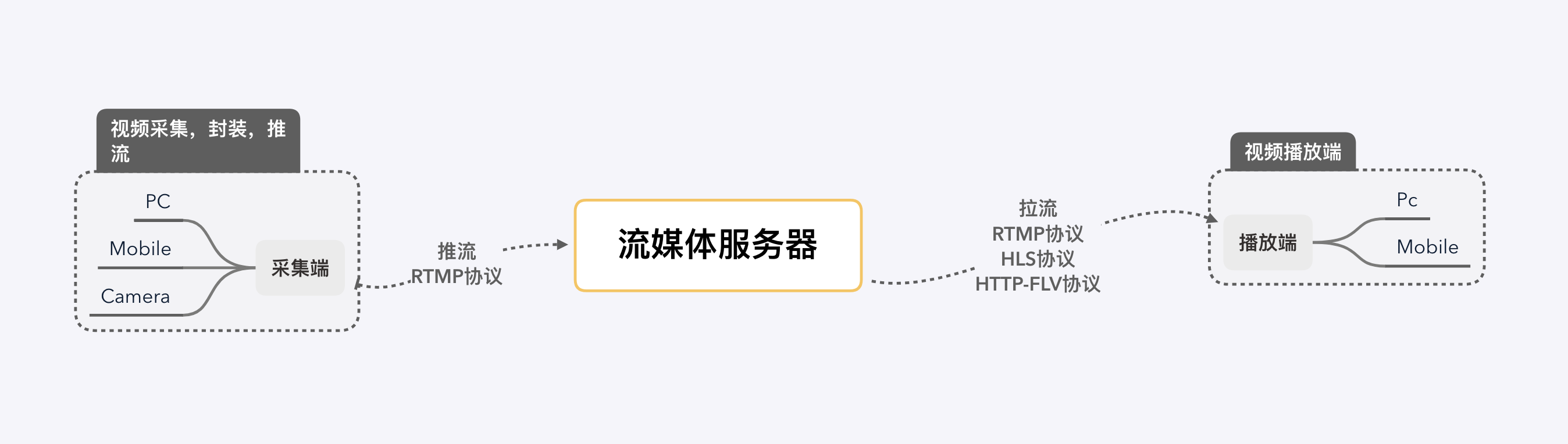
This article mainly records in the push stream end of the video capture, filters and other processing, coding-related knowledge.
Articles in the same series:
- Live video knowledge I: Data Acquisition and Encoding
- Live video knowledge II: Push and Pull Streams, and Server-Side Processing
- Live video knowledge III: Playback and Playback Completion
- Live video knowledge IV: Live Demo – RTMP Push and HTTP-FLV Pull Streams
1 Data acquisition
Capture, the first part of the start of live video streaming, allows users to capture video through different terminals. The capture process of video is mainly captured into raw data in YUV or other encoding by devices such as cameras. The common formats of raw video are YUV (YUV420, YUV422, YUV444, etc.). The acquisition process of audio is mainly captured into PCM or other encoded raw data from analog signals in the environment by devices such as microphones.
1.1 Raw video data encoding
First understand a few parameters that describe the video:
- Frame rate, which refers to the number of frames included in a video per second (FPS, Frame per second), i.e., the number of frames. The higher the frame rate, the more realistic and smooth the video.
- Resolution, a parameter used to measure the amount of data in an image, and is closely related to video clarity.
1.1.1 RGB
RGBEach pixel point in an image has Red (R), Green (G), and Blue (B) three primary colors 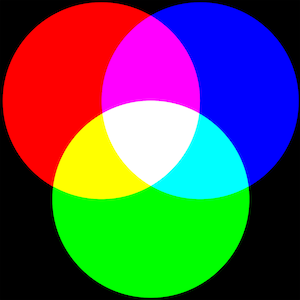
- RGB24 : RGB values encoded in 24 bits per pixel (bpp): three 8-bit unsigned integers (0 to 255) are used to represent the intensity of red, green and blue. A pixel point is 24bit, i.e. 3 bytes (3B), a 1920 * 1080 image is 1920 * 1080 * 3 / 1024 / 1024 = 2.63MB.
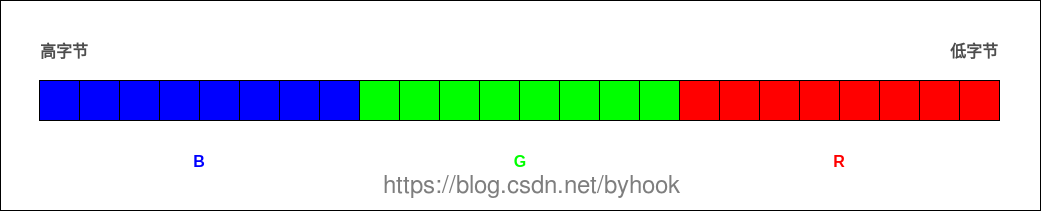
- RGB32 : This is RGB24 with an alpha channel, the remaining 8 bits are used to represent the transparency (Alpha) of the pixel.
Taking a video with a resolution of 1920×1280 and a frame rate of 30 as an example, encoded in RGB, the size of one second of video is 1920×1280x24x30=1769472000bit, which equals to about 211MB, and if it is a 90-minute video it is about 1,112GB. this is too big, so we need another encoding format that is more bandwidth efficient.
1.1.2 YUV
YUV color coding uses Brightness (Y) and Chroma (UV) to specify the color of a pixel. It is a color mode that takes advantage of the fact that the human eye is sensitive to brightness but relatively insensitive to chroma, and reduces the amount of data by scaling down the chromaticity samples without a significant degradation in image quality.
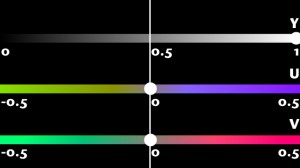
- Y denotes Luminance or Luma, which is the gray scale value. A black and white video has only Y pixels.
- U and V represent Chrominance or Chroma, which describes the hue and saturation of the image.The color gamut represented by UV does not represent all the colors available in the RGB color gamut. As shown in the figure below, the square inside is the color gamut represented by UV when Y=0.5.
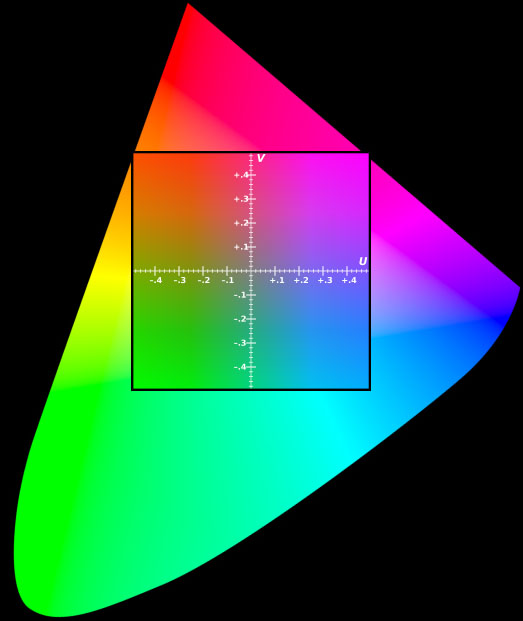
YUV separates the luminance (Y) information from the chrominance (UV) information and uses a more “aggressive” compression scheme for the chrominance (UV) information. On average, most YUV formats use fewer than 24 bits per pixel than RGB, thus consuming less bandwidth. 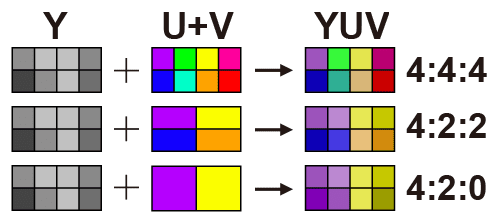
- YUV444: Fully sampled.
- YUV422: Horizontal 2:1 sampling, vertical full sampling.
- YUV420: horizontal 2:1 sampling, vertical 2:1 sampling. It is the more common format and is one-half smaller than RGB24.
1.1.3 Interconversion of RGB and YUV
For an image monitor, it displays the image using the RGB model and uses the YUV model when transferring the image data because the YUV model saves bandwidth. This is because the YUV model saves bandwidth. Therefore, it is necessary to convert the RGB model to the YUV model when capturing an image, and then convert the YUV model to the RGB model when displaying it.
- RGB to YUV
1
2
3
Y = 0.299 * R + 0.587 * G + 0.114 * B
U = -0.147 * R - 0.289 * G + 0.436 * B
V = 0.615 * R - 0.515 * G - 0.100 * B
- YUV to RGB
1
2
3
R = Y + 1.14 * V
G = Y - 0.39 * U - 0.58 * V
B = Y + 2.03 * U
1.2 Encoding of raw audio data
Describes several parameters of the PCM data:
- Sampling frequency: 8kHz (phone), 44.1kHz (CD), 48kHz (DVD). The higher the sampling frequency, the larger the amount of data, and at the same time, the higher the audio quality.
- Bitwidth: Commonly used bitwidth is 8bit or 16bit, the bitwidth indicates the size of each sampling point, the more bits, the larger the data volume, and the higher the audio quality at the same time.
- Number of channels: 1 (mono) and 2 (duo) are common. Audio capture and playback can be superimposed, and channels indicate the number of audio sources for sound recording or the corresponding number of speakers for playback.
- Audio frame: It is generally agreed to take the amount of data in units of 2.5ms~60ms as a frame of audio. This time is called “sampling time”.
2 Processing
2.1 Video processing
Video processing includes processing such as beauty, watermark, and various custom filters.
- The technical term for dermabrasion is “denoising”, i.e. removing or blurring the noise in an image. Common denoising algorithms include mean blur, Gaussian blur and median filter.
- Watermarking can be used for simple copyright protection, or advertising settings.
- Filter: Each frame of a static image or video is processed as a picture, which is achieved by changing the coordinates of pixel points and RGB color values.
ios can rely on the open source library GPUImage to realize it, android also has the corresponding android-gpuimage.
GPUImage: A cross-platform framework for image and video processing based on OpenGL. GPUImage provides a wide variety of filters, and can also be used for skinning, watermarking, and other functions. OpenGL: OpenGL (Open Graphics Library) is a specification that defines a cross-programming language, cross-platform programming interface for 3D graphics (2D is also available). openGL is a professional graphics programming interface, a powerful, easy to call underlying graphics library. OpenGL ES: OpenGL ES (OpenGL for Embedded Systems) is a subset of the OpenGL 3D graphics API designed for embedded devices such as cell phones, PDAs and game consoles.
2.2 Audio Processing
Audio processing includes processing such as mixing, noise reduction and sound effects.
3 Coding and Encapsulation
Even for raw video in YUV420 format, the data storage space is still large. This data needs to be compressed and encoded, and then encapsulated into a file that the user can play directly, such as mp4, mkv, and so on.
3.1 Coding
- Video encoding: video encoding is designed to compress video pixel data into video streams to reduce the size of the video so as to facilitate network transmission and storage. The common ones are: H.264, MPEG-4, MPEG-2 and so on.
- Audio coding: Video coding is to convert the raw audio data into audio streams for transmission over the network. Common ones are: AAC, MP3, WMA, AC-3, etc.
3.1.1 Principles of video coding
Why can huge raw videos be encoded into very small ones? What is the technology involved? The core idea is to remove redundant information:
- Spatial redundancy: strong correlation between neighboring pixels of an image. For example, a solid color image where all pixels are coded the same.
- Temporal redundancy: similarity of content between neighboring images in a video sequence. For example, there are ten seconds or so in a video sequence that are almost motionless; or a video sequence in which only the characters (some pixels) are moving and the background (other pixels) are almost motionless.
- Coding redundancy: different pixel values appear with different probabilities.
- Visual redundancy: the human visual system is not sensitive to certain details.
Among them, elimination of spatial redundancy, temporal redundancy and coding redundancy does not lead to information loss and belongs to lossless compression. Whereas, elimination of visual redundancy trades a certain amount of objective distortion for data compression and belongs to lossy compression. For these different types of redundant information, various techniques are used to improve the compression ratio of the video. Some of the common ones are predictive coding (removing spatial and temporal redundancy), transform coding (removing spatial redundancy and visual redundancy) and entropy coding (removing coding redundancy).
3.1.2 Predictive coding
Before we talk about predictive coding, let’s understand the concept of frames. As mentioned above, the frame rate of a video is the number of frames per second, i.e. the number of frames. Frames can be categorized into 3 types:
- I-frame: Independent frame, the most complete picture (occupying the most space), which can be decoded independently without reference to other images. The first frame in a video sequence is always an I-frame.
- P-frame : “Inter-frame predictive coding frame”, need to refer to the previous I-frame or different parts of the P-frame to encode, P-frame is dependent on the previous P and I reference frames, has a higher compression rate, and occupies less space.
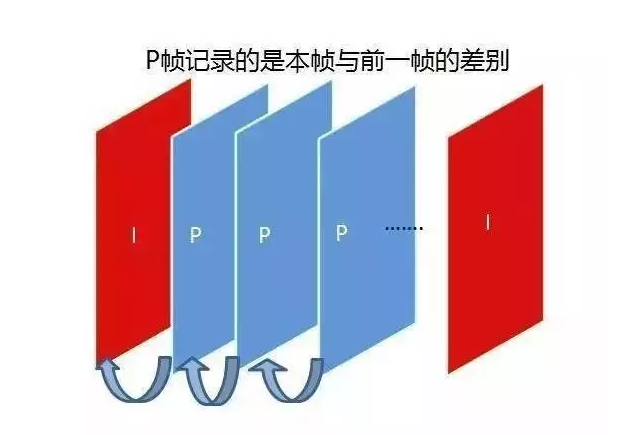
- B frame : “Bidirectional predictive coding frame”, the frame after the previous frame is used as the reference frame, not only the front frame but also the back frame. It not only references the previous, but also the following frames, so it has the highest compression ratio, which can be up to 200:1. However, it is not suitable for real-time transmission (e.g., videoconferencing) because of its dependence on the following frames.
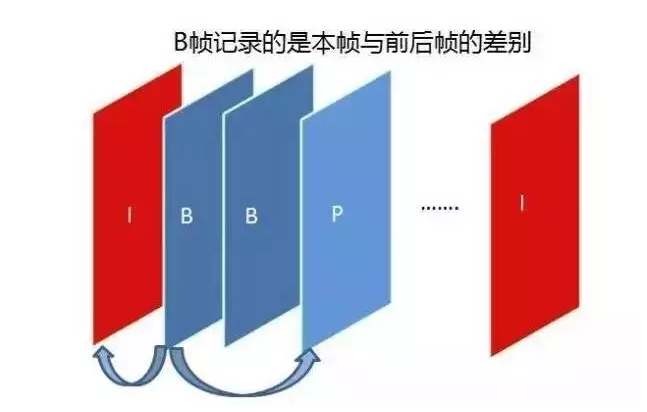
Predictive coding in video processing is divided into two main categories: ** intra-frame coding** and ** inter-frame coding** . Usually, in a video stream, all I-frames are encoded using intra-frame coding, and the data in P-frames/B-frames may be encoded using intra-frame or inter-frame coding.
- In-frame coding: Utilizing only the spatial correlation within the image of the frame, the part of the current frame that has been coded to infer what the current part of the data to be coded, the predicted value and the actual value are located in the same frame, removing the spatial redundancy information. Characterized by: relatively low compression rate; can be decoded independently, does not rely on data from other frames.
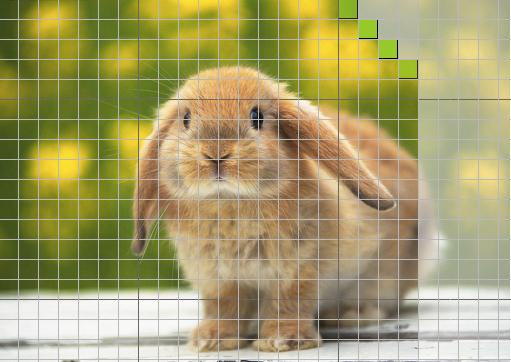
Inter-frame coding: Simultaneously utilizes spatial and temporal correlation to infer what the current part of the data to be compressed is from the frame (or frames) before (or after) this frame, utilizing Motion Estimation and Motion Compensation, and removing temporal redundancy information. Characterized by: higher compression rate than intra-frame prediction; cannot be decoded independently, and the current frame can only be reconstructed after obtaining the reference frame data.
The following figure generates video with movement vectors using ffmpeg and then outputs each frame as an image. The posterior image (P frame) is encoded according to the vector difference with the reference frame of the anterior image (reference frame, I or P frame). 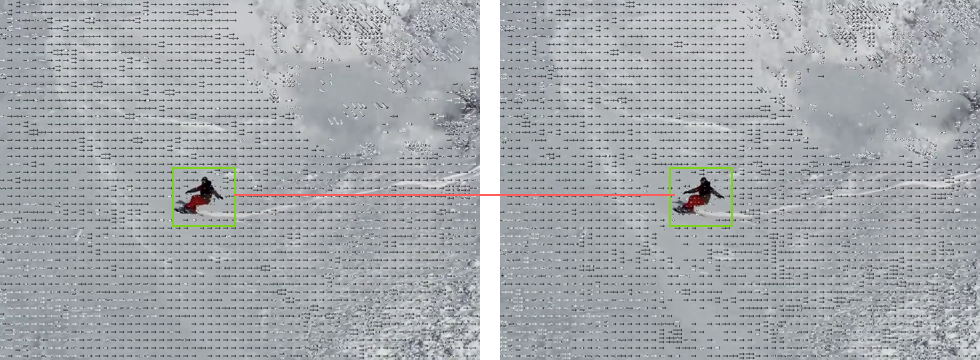
3.1.3 Transformation codes
The current mainstream video coding algorithms belong to lossy coding, which obtains relatively higher coding efficiency by causing a limited and tolerable loss to the video.
Firstly, the image information needs to be transformed from the spatial domain to the frequency domain by transform coding transform, and the transform coefficients are calculated for subsequent coding. Taking the discrete cosine transform (DCT) as an example, the image first needs to be divided into image blocks that do not overlap each other. Assuming that the size of a frame is 1280 x 720, it is first divided into 160 x 90 8 x 8 blocks of non-overlapping images in the form of a grid, and then the DCT transform is applied to each of these blocks from the spatial domain to the frequency domain to derive the pixel components.
The figure below shows the coefficients of a particular image after DCT transformation, where large values indicate high frequencies and small values indicate low frequencies. A small difference in values indicates high correlation between pixels. The human eye is sensitive to low-frequency characteristics of an image, such as the overall brightness of an object, but not to high-frequency details in the image.
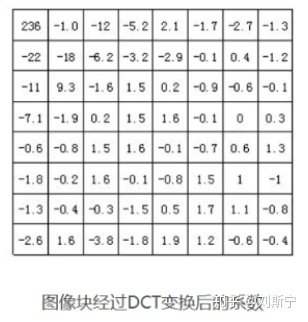
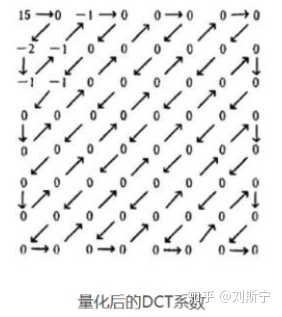
Then quantization is carried out, through the fine quantization of the coefficients in the low-frequency region and the coarse quantization of the coefficients in the high-frequency region, the high-frequency information that is not sensitive to the human eye is removed, i.e., the visual redundancy is removed, so as to reduce the amount of information transmission. The following figure shows the quantization result, at this point, only these non-zero values can be compressed and encoded.
3.1.5 Entropy coding
Entropy coding has the function of eliminating statistical redundancy between data, and is used as a final process at the coding end to write syntactic elements into the output code stream.
Entropy coding can be categorized into variable-length coding and arithmetic coding, of which the most commonly used is variable-length coding (optimal coding). Variable-length coding, is to assign short word-length binary codes to symbols with a high probability of occurrence, and for symbols with a low probability of occurrence assign long word-length binary codes to obtain the code stream with the shortest average code length of the symbols. That is, short codes are assigned to pixel color codes with high probability of occurrence, thus eliminating coding redundancy.
3.1.1 International standards for video coding
Encoders have evolved over the decades from supporting only intra-frame encoding to the new generation of encoders represented by H.265 and VP9.
- H.26X: ITU proposed H.261, H.262, H.263, H.264, H.265 (the latest video coding system standard), these are collectively referred to as the H.26X series, is mainly used in real-time video communications, such as conference TV, video telephony;
- MPEG : ISO/IEC proposed MPEG1, MPEG2, MPEG4, MPEG7, MPEG21, collectively known as MPEG series.
- VPX : VP8, VP9. first developed by On2 Technologies and then released by Google.
3.2 Encapsulation
Packaging, that is, has been encoded and compressed video track and audio track, and some metadata tag information, packaged together into a playable resource file, such as mp4 and so on.
| Video File Format | Video Package Format |
|---|---|
| .avi | AVI (Audio Video Interleaved) |
| .wmv, .asf | WMV (Windows Media Video) |
| .mpg, .mpeg, .vob, .dat, .3gp, .mp4 | MPEG (Moving Picture Experts Group) |
| .mkv | Matroska |
| .rm, .rmvb | Real Video |
| .mov | QuickTime File Format |
| .flv | Flash Video |
The metadata tag information of the video can be viewed using the command ffmpeg, ffmpeg -i xxx.mp4. 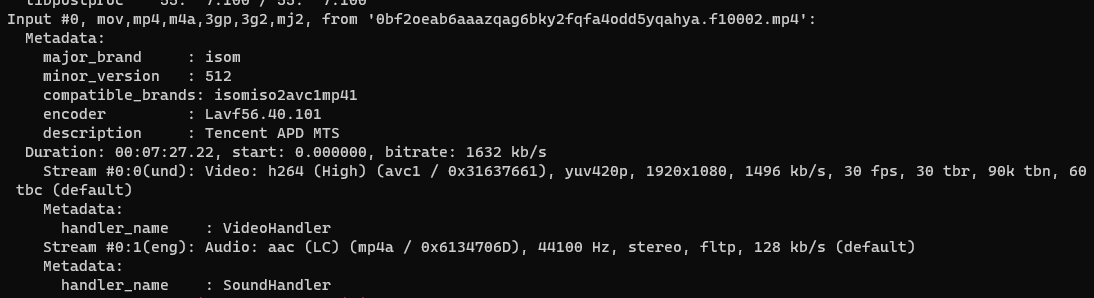
Reference
- Wikipedia-Three primary color light patterns e6%98%be%e7%a4%ba%e6%a8%a1%e5%bc%8f)
- Wikipedia-YUV
- Live Video Technology Explained Series II: Capture
- Live Video Technology Explained Series No. 3: Processing
- Live Video Technology Explained (IV): Coding and Packaging
- Video compression and coding and decoding of the basic principles
- Front-end how to realize the whole set of live video technology process