Live Video Knowledge II: Push and Pull Streams, and Server-Side Processing
Preface
This article mainly records the streaming media transmission protocols used to push streams at the collection end and pull streams at the pull stream end, as well as transcoding, security detection, and CDN distribution and other related knowledge at the server side.
Articles in the same series:
- Live video knowledge I: Data Acquisition and Encoding
- Live video knowledge II: Push and Pull Streams, and Server-Side Processing
- Live video knowledge III: Playback and Playback Completion
- Live video knowledge IV: Live Demo – RTMP Push and HTTP-FLV Pull Streams
1 Push and pull flow
Push streaming, which refers to the process of transmitting packetized content from the capture phase to the server. To be used for push streaming it is also necessary to encapsulate the audio and video data into streaming data using a transport protocol. Commonly used transport protocols are RTSP, RTMP, HLS and so on.
Pull stream, refers to the server has live content, according to the type of protocol (such as RTMP, RTP, RTSP, HTTP, etc.), and the server to establish a connection and receive data, the process of pulling.
Next, the streaming transport protocols commonly used for push and pull streams are introduced.
2 Streaming Media Delivery Protocol
2.1 RTMP (push and pull streams)
RTMP (Real Time Messaging Protocol) is the current mainstream streaming media transmission protocol, widely used in the field of live broadcast. It is a private protocol developed by Macromedia (later acquired by Adobe) for Flash Video (Flash player, referred to as flv), the video must be encoded in H264, the audio must be encoded in AAC or MP3, and basically encapsulated into a streaming file in FLV (flv tag) format.
Merits:
protocol developed specifically for streaming media, the optimization of the underlying layer is more excellent than other protocols.
On the capture side, basically all the encoders (photo apps and so on) support RTMP output; on the streaming side, the mainstream browsers on the PC side (especially windows browsers) have a high degree of support for flash players.
- Relatively low latency, generally between 2-5s latency, suitable for general video conferencing, interactive live streaming
- Good CDN support, supported by mainstream CDN vendors.
Weaknesses:
Based on TCP, the transmission cost is high, which is a significant problem in weak network environments. And the RTMP protocol itself is more complicated to establish a connection for the first time when the handshake process.
FLV format streaming file must use flash player to play, the degree of support for mobile browsers is low.
2.2 HTTP-FLV (stream pulling)
HTTP-FLV, i.e., encapsulate the streaming data into FLV format and then transmit it to the client via HTTP protocol.
Merit :
HTTP long connections, flexible scheduling/load balancing with HTTP 302 hops, support for encrypted transfers using HTTPS.
HTTP itself does not have complex state interactions. So from a latency perspective, HTTP-FLV is superior to RTMP.
Weaknesses :
- The data format is flv, which faces the same browser compatibility problem as RTMP. It needs to be realized with the help of Flv.js library, and Flv.js is also not supported by some browsers.
Flv.js, a JavaScript library that implements the playback of FLV-formatted video in HTML5 video. It works by multiplexing a stream of FLV files into ISO BMFF (MP4 fragments) clips, and then updating the video content by continuously adding MP4 clips to the
videocontainer via Media Source Extensions.
2.3 HLS (pull stream)
HLS (HTTP Live Streaming), is an HTTP-based media streaming protocol implemented by Apple. It takes a video stream and splits it into smaller HTTP-based files for download. While the stream is playing, the client can conveniently switch between different bitrate streams for a better viewing experience, depending on the current network environment.
The transmission includes two parts: 1.M3U8 description file; 2.TS media file.The video in the TS media file must be H264 encoded and the audio must be AAC or MP3 encoded.
Merit :
- Can be played with HTML5
videofor better browser compatibility
Cons.
Longer first handshake time, total latency when HLS connects for the first time includes: tcp handshake, m3u8 file download, ts file download.
Higher latency for direct broadcast, requires 5-20s delay. According to the ts slicing interval, generate TS file and update M3U8 file every time. For example, if the interval is 12s, in the live broadcast environment, the media server has to wait for 12s of data to be pushed up before returning to the playback side.
2.4 DASH (stream pulling)
DASH (Dynamic Adaptive Streaming over HTTP) , is a Video Streaming technology that delivers dynamic bitrate over the Internet. Similar to Apple’s HLS, it runs over HTTP, uses TCP as its transport protocol, splits the video into multiple clips through a matching index file, and provides adaptive bitrate streaming. b.com and youtube are using it.
Difference from HLS :
Encoding Format: MPEG-DASH allows the use of any encoding standard, as opposed to HLS, which requires the use of H.264 or H.265. * Segmentation: MPEG-DASH typically delivers video in smaller segments than HLS.
Segmentation: MPEG-DASH typically delivers video in smaller segments than HLS, which has a default segment length of 10 seconds, while MPEG-DASH clips are typically 2-4 seconds long.
Standardization: MPEG-DASH is an international standard; HLS was developed by Apple and, while widely supported, has not yet been released as an international standard.
HTML5 support: HLS is automatically supported by HTML5, but MPEG-DASH is not and requires the Dash.js library (similar to Flv.js, which utilizes Media Source Extensions to play MPEG-DASH content).
2.5 WebRTC (push and pull streams)
WebRTC (Web Real-Time Communications) is a real-time communications technology that allows a web application or site to establish a Peer-to-Peer connection between browsers for the transmission of video and/or audio streams or other arbitrary data without the use of an intermediary medium. It is commonly used in video/teleconferencing and connectivity.
The WebRTC architecture is shown below, from top to bottom:
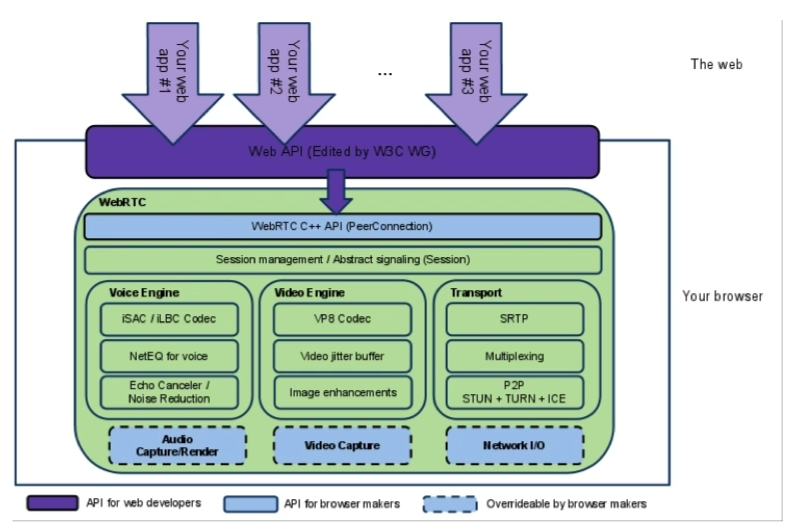
Web API layer : Provides standard API (javascirpt) for front-end developers, i.e., encapsulation of the C++ API of the core layer of webrtc.
WebRTC C++ API Layer : Provides the C++ API to the core layer of WebAPI layer, including media capture device management and connection.
- Session layer : Context management layer, data transfer for audio, video, non-audio video
Device engine and transport module : Audio engine, video engine, transport module. In the transport module.
RTP (Real-time Transport Protocol or abbreviated RTP) is a network transport protocol that details the standard packet format for delivering audio and video over the Internet. SRTP (Secure Real-time Transport Protocol) is a transport protocol that adds security mechanisms to RTP.
Multiplexing, where multiple streams multiplex the same channel.
Utilizes NAT penetration technology to connect remote nodes for P2P such as ICE, STUN, and TURN.
Peer-to-peer networks (abbr. P2P ), an Internet system that exchanges information without a central server and relies on groups of users (peers), which serves to reduce the number of nodes in previous network transmissions in order to reduce the risk of data loss. NAT Network Address Translation (NAT) is a technology that rewrites the source or destination IP address of an IP packet as it passes through a router or firewall. It is used to convert internal private IP addresses into public IP addresses that can be used on the public network, initially to solve the problem of a shortage of public IP addresses. The problem. Therefore, in p2p networks, it is necessary to use NAT penetration technology to be able to transmit over the extranet.
- Hardware devices: including capture devices for audio and video, network IO.
Merits.
The bottom layer is based on SRTP and UDP, and there is much room for optimization in the case of weak network.
Point-to-point communication can be realized, and the delay between the two sides of the communication is low.
For Web development, W3C standard, PC terminal mainstream browser support degree is high. Google in the back support.
Cons.
- Reliable transmission of UDP, such as packet loss retransmission, network jitter handling
- Low mobile browser support
ICE,STUN,TURN traditional CDN does not have similar services to provide.
- Involving multiple protocols, the learning cost is relatively high.
2.6 Summary
In the scenario of live push streaming, RTMP protocol is designed for streaming media, and compared with WebRTC, CDN support is higher, so RTMP is used more in push streaming.
In a live streaming scenario, the
| RTMP | HTTP-FLV | HLS | DASH | |
|---|---|---|---|---|
| Connections | HTTP Short Connections | TCP Long Connections | HTTP Long Connections | HTTP Long Connections |
| Data Segmentation | Continuous Streaming | Continuous Streaming | Slice | Slice |
| Delay | Fast | Fast | Slow (depending on slicing) | Slow (slicing intervals are usually shorter than HLS) |
| Web compatibility | poor | poor, but can be implemented using MediaSource | good | poor, but can be implemented using MediaSource. Encoding format support and standardization is better than HLS |
Prefer HTTP-FLV as it has low latency and performance.
Use Flash player to broadcast RTMP stream if flv.js is not supported.
If you don’t want to use Flash compatibility, you can also use DASH/HLS, but the latency is higher.
3 Server processing
3.1 Transcoding
Bit rate is the number of bits of data transmitted per unit of time during data transmission, generally we use the unit of kbps, i.e. kilobits per second. The larger the bit rate, the higher the precision, the closer the processed file is to the original file, the larger the file size.
Transcoding (Video Transcoding) refers to the video stream has been compressed and encoded video stream into another video stream to adapt to different network bandwidth, different terminal processing capabilities and different user needs. Transcoding is essentially a process of decoding and then encoding, so the streams before and after conversion may or may not follow the same video coding standards.
In the scenario of live broadcasting, the real-time transcoding function is to provide multiple code rates (definition) for the same push stream at the same time, in order to achieve the clarity of the playback side of the stream address service to realize the clarity of switching.
The resolution and bit rate corresponding to the clarity are generally as follows:
| Sharpness | Resolution (high, wide adaptive) | Bitrate (Kbps) |
|---|---|---|
| Smooth | 360 | 460 |
| Standard Definition | 432 | 640 |
| HD | 648 | 1200 |
| Ultra HD | 1080 | 2100 |
In the scenario of uploading a video, transcoding also includes: converting various formats to highly compatible formats such as mp4; outputting gifs; multiplying transcoding, and so on.
3.2 Security detection
Video detection, pornography, riot identification, etc.
3.3 CDN distribution
The content distribution network (CDN) can redirect user requests to the nearest service node in real time based on network traffic and the connection and load status of each node, as well as the distance to the user and response time and other comprehensive information. Its purpose is to enable users to obtain the required content in the vicinity, to solve the Internet network congestion, and to improve the response speed of users accessing the website.
Live delivery network is different from the pain points of traditional CDN:
Streaming protocol support, including RTMP, HLS, HTTP-FLV, etc.
The delay from the streaming end to the playback end is controlled between 1~3 seconds.
Chinese companies going overseas has become a big trend, CDN needs more overseas nodes.